Best AI Agents for Business in 2026 (Tested and Priced)
A working shortlist of the best AI agents for business in 2026. What each one really costs, where it wins, where it fails, and which fits a small team.
A quote sat unsent since Tuesday. An invoice went out 6 days late. Neither one showed up in a report.
Most lists on this keyword count tools. This one prices the work, gives every option a weakness, and holds the managed route I sell to the same test.
The best AI agents for business in 2026 are not one product. Managed agents suit owners who want one workflow built and run for them. Lindy and Zapier suit teams that build automations themselves. Agentforce and Intercom Fin fit companies already paying for Salesforce or a support desk. Match the agent to a workflow, not to a category.
TL;DR
- Judge an agent by cost per 1,000 tasks. The monthly sticker hides the unit that sets the bill.
- At published rates, 1,000 tasks cost $990 on Intercom Fin, $2,000 on Agentforce, and about $10 on Lindy credits.
- Every self-serve tool here beats the managed route on trials and price transparency.
- The managed route buys one thing the tools do not. Someone watches the workflow after week 2.
- All prices were read from vendor pages on 20 October 2026.
What separates a business AI agent from the chatbot you already pay for?
A chatbot answers a question and stops. A business AI agent takes a goal, reaches into your own tools, finishes the steps, and reports back. The test is whether something changed in your inbox, your calendar or your books without you copying it across.
The loop is what produces the change. It plans, calls a tool, reads the result, then decides the next step.
If you want the mechanics without the marketing, examples of AI agents at work walks the loop through real jobs.
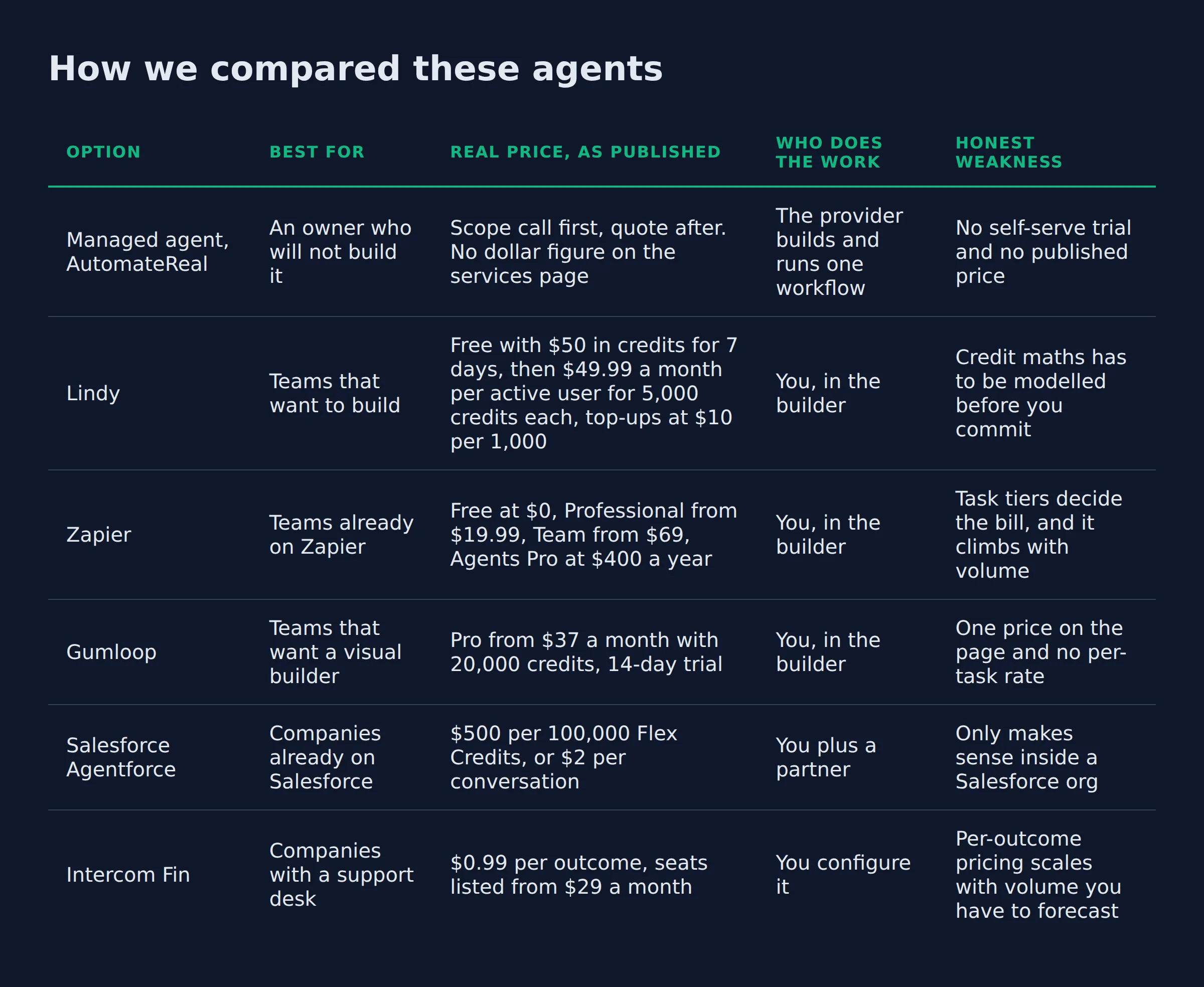
How we compared these agents
Each row carries the vendor’s published rate and the cost of 1,000 tasks, read on 20 October 2026. It also names the builder, the owner after week 2 and one weakness, my own option included.
| Option | Best for | Real price, as published | Who does the work | Honest weakness |
|---|---|---|---|---|
| Managed agent, AutomateReal | An owner who will not build it | Scope call first, quote after. No dollar figure on the services page | The provider builds and runs one workflow | No self-serve trial and no published price |
| Lindy | Teams that want to build | Free with $50 in credits for 7 days, then $49.99 a month per active user for 5,000 credits each, top-ups at $10 per 1,000 | You, in the builder | Credit maths has to be modelled before you commit |
| Zapier | Teams already on Zapier | Free at $0, Professional from $19.99, Team from $69, Agents Pro at $400 a year | You, in the builder | Task tiers decide the bill, and it climbs with volume |
| Gumloop | Teams that want a visual builder | Pro from $37 a month with 20,000 credits, 14-day trial | You, in the builder | One price on the page and no per-task rate |
| Salesforce Agentforce | Companies already on Salesforce | $500 per 100,000 Flex Credits, or $2 per conversation | You plus a partner | Only makes sense inside a Salesforce org |
| Intercom Fin | Companies with a support desk | $0.99 per outcome, seats listed from $29 a month | You configure it | Per-outcome pricing scales with volume you have to forecast |
Prices read from the vendors’ own pricing pages on 20 October 2026. Re-check before you buy.
Two of the lists I read for this page, Coworker’s 16-agent roundup and Lindy’s 10-agent small business list, both sort tools by category. Neither prints a weakness for any tool it recommends.
The ranked list of top AI agents sorts agents by the job they do. This page prices 6 of them against the same 1,000 tasks and says where each one fails.
A vendor that will not publish a rate has already told you something about the sales process.
Which agent handles customer questions and intake best?
Intercom Fin fits customer questions best, because it bills per outcome and sits on a desk your team already uses. A managed build wins when the intake form itself is broken, which is the usual root cause of a slow reply.
Intercom Fin
- Best for: a company already paying for a help desk, with repeat questions stacked in a queue.
- Price: $0.99 per Fin outcome, with seat plans listed from $29 per seat a month, per Fin’s per-outcome price.
- What it adds: the bill follows closed conversations, so a busy month costs more and a quiet one costs less.
- Where it breaks: you have to forecast volume. A spike in tickets turns into a spike in spend.
Moveworks, Decagon and Sierra sell support agents to enterprise buyers. ChatGPT, Claude, Gemini, Copilot and Grok answer questions in a chat window. Perplexity and Manus research, and Devin, Cursor and Replit write code. None of them fixes a form that asks the wrong question, and that form is what feeds the queue.
Which agent handles sales follow-up and quote chasing best?
Lindy fits follow-up best, because a routine on a schedule is the whole product. Zapier wins when the follow-up has to touch a CRM and 3 other apps. Both put the build on you.
Lindy
- Best for: an owner who sends one quote and then gets busy, so the second message never goes out.
- Price: $50 in free credits for 7 days, then $49.99 a month per active user for 5,000 credits each, per Lindy’s published pricing.
- What it adds: scheduled routines, memory in files you can open and edit, and approval before a send.
- Where it breaks: every active user is billed from $49.99 a month for 5,000 credits each, so 3 users start at $149.97 before a top-up.
Zapier
- Best for: the follow-up that has to read the CRM, write a row, then post in Slack.
- Price: free at $0 with 100 tasks a month, Professional from $19.99 a month, per Zapier’s plan list. Team runs $69 a month, and Agents Pro is $400 billed annually for 1,500 activities.
- What it adds: the widest app coverage of the group, inside an account you may already pay for.
- Where it breaks: every action in a zap spends a task, so the tier you pick sets the ceiling.
I automated my own follow-up before anything else. The first message to a lead stays human. The 3 that follow it do not need to be, and that is where the quotes get chased.
Which agent handles the back office best, from inbox to invoicing?
Gumloop fits the back office best, because $37 a month buys 20,000 credits and unlimited seats on one visual canvas. It moves data between your tools. It does not close your books.
Gumloop
- Best for: a small office where one person owns the flows and everyone else needs to see them.
- Price: Pro starts at $37 a month with 20,000 credits and a 14-day free trial, per Gumloop’s pricing page.
- What it adds: unlimited seats on Pro, so the whole office sees the same canvas.
- Where it breaks: an 8% orchestration fee rides on top of your model spend, and the page prints one price.
The builder market is crowded. Make, n8n, Relevance AI, Microsoft Copilot Studio and OpenAI’s agent tooling all sell a version of one canvas. LangChain and CrewAI are building blocks for developers. A small team wants a finished product. OpenClaw is the open-source option in that group, per its GitHub repo.
Inbox triage, invoice chase, review requests and the weekly report all follow the same shape. Read a record, decide, write a record, notify a person.
What does each one cost at 1,000 tasks a month?
At 1,000 tasks a month, Intercom charges $990 in outcomes, Agentforce $2,000 in conversations, and Lindy about $10 in credits. The spread comes from the unit itself. A task means a closed chat, a conversation, a credit or one app action depending on who is selling.
| Option | What one task is | Rate used in the maths | Seat or user charge | Cost of 1,000 tasks | What that hides |
|---|---|---|---|---|---|
| Intercom Fin | One outcome | $0.99 per outcome (Intercom) | Seats from $29 each | $990 | A closed conversation counts once, so the bill tracks resolution and not effort |
| Salesforce Agentforce | One conversation | $2 per conversation (Agentforce pricing) | Agentforce User License at $5 per user a month | $2,000 | A conversation is a session, so the unit ignores how long the chat ran |
| Lindy | Credits | About $10 per 1,000 credits, since $49.99 buys 5,000 (Lindy’s published pricing) | Every active user from $49.99 a month for 5,000 credits each | $10 | A multi-step run spends several credits, so 1,000 credits is fewer than 1,000 jobs |
| Gumloop | Credits | Credit index $0.005 each, or $5 per 1,000. The $37 plan bundles 20,000, about $1.85 per 1,000 (Gumloop’s pricing page) | Unlimited seats on Pro | About $1.85 | The 8% orchestration fee sits outside the credit price |
| Zapier | One successful action in a zap | Tier-based from $19.99 a month (Zapier’s plan list) | Tasks are the meter, not seats | Depends on the tier | The free plan stops at 100 tasks, so 1,000 needs a paid tier |
| Managed agent, AutomateReal | One workflow, not a task | No published rate | Named in the scope call | Quoted after a scope call | The price covers the build and the watching |
The unit is the trap. Agentforce sells conversations, so the bill follows sessions. Fin bills per closed conversation, counted once, so a quiet week costs less and a busy one costs more.
My own outreach runs about 200 form submissions a day. That is 6,000 records a month. A per-task agent has to clear all 6,000 before it earns a slot in the stack.
Run the same division on any quote you get. Take the published rate, multiply by your true monthly volume, then compare that to the hours the job eats now.
Who does the work: your team, the vendor, or a managed service?
Three models exist. You build it yourself. You buy a canvas and still own the work, or a managed service builds one workflow and runs it. The real question is who gets the alert at 7am when the agent starts sending duplicates.
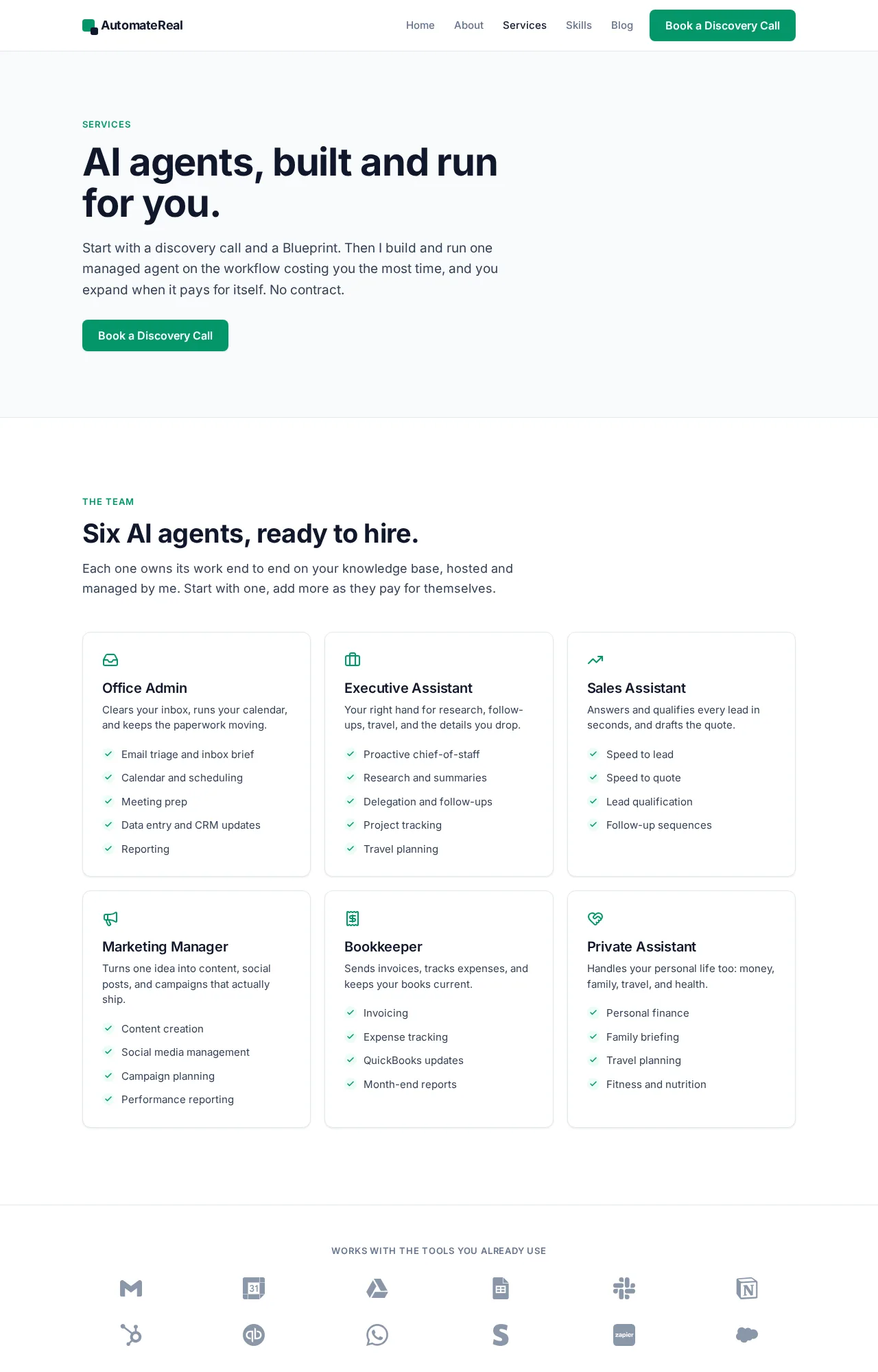
The services page for the managed model. Scope call first, quote after.
The AI services page describes the third model. A scope call, a Blueprint that maps the workflow and its approval points, then one agent built and run for you. The roles run from office admin and executive assistant to sales assistant, marketing manager, bookkeeper and private assistant.
The managed route loses on 2 counts, and I will say so first. What it costs arrives as a quote after a scope call. You cannot test it for an afternoon the way you can test Lindy.
Every system I run has broken in a boring way. A renamed form field, an expired API token, a webhook that started returning 500s. None of that shows up in a vendor demo, and all of it needs a person who knows the flow.
Full disclosure: the managed route in this table is the one I sell, and my own agency runs on agents I built. That bias is on the table, which is why every row above carries a flaw.
Is it safe to let an agent touch your business data?
An agent is as safe as the permissions you give it. Start it read-only, scope it to one system, and log every write. The failures I have seen start with a key that carried more access than the job needed.
The NIST AI Risk Management Framework splits the work into 4 functions: govern, map, measure and manage. Use those words on a vendor call and the answers get specific fast.
- What does it read? Get the scope in writing before the first run.
- What does it write? Every write should leave a log line you can search.
- Where does the data sit? Data residency matters the moment you have Canadian or EU customers.
- Does the model train on your data? Ask for a yes or a no in writing.
- Who can stop it? Name one person and one kill switch.
SOC 2 and GDPR come up in every call. Both are the floor, and the useful questions start above it. MCP is the open standard for connecting assistants to tools, and its security guidance covers authorization and consent, per the MCP spec. Human in the loop is a setting you configure.
I keep every new agent read-only for its first week. An agent that can only read cannot send the wrong email to 300 people.
Which agent fits a team of one, a five-person office, or a twenty-seat support desk?
A team of one should run one managed workflow, because nobody in a one-person business has a spare evening for a builder. A five-person office fits Gumloop or Zapier, with one named owner. A twenty-seat support desk fits Intercom Fin, billed per outcome.
- Team of one: one managed workflow, or Lindy if you will build it yourself. Budget an evening a week for the first month.
- Five-person office: Gumloop or Zapier, with one person who owns the flows and one backup who can read them.
- Twenty-seat support desk: Fin, where the bill tracks resolutions instead of seats.
The lighter explainer lives at AI agents for small business, if you want the build-or-buy question answered before you commit to a tool.
The vertical versions of this page cover HVAC, home service, property management, insurance and dental.
What would you set up in the first 30 days?
Pick one workflow and run it in draft mode for 2 weeks. Then count 3 numbers: fixes per 100 runs, minutes per run and cost at the published rate. A workflow that fails 2 of the 3 goes back to manual work.
- Week 1: write the workflow down as steps, including the point where a human approves.
- Week 2: run it in draft mode. Every output lands in a queue and nothing sends.
- Week 3: approve or fix every draft, and count the fixes.
- Week 4: turn on sending for the runs that came back clean, and keep the rest in draft.
The number that matters at day 30 is fixes per 100 runs. Above 10, the workflow is not ready to run alone, whatever the demo showed.
If you want a second read on it, I will do a free comparison on a short call. You leave with the one workflow worth automating first and what it costs you in hours each week.
FAQ
Are there free AI agents for a business?
Yes. Free entry points exist, and they pay for the software while the setup stays yours. Zapier’s free plan runs 100 tasks a month at $0. Lindy hands you $50 in credits for 7 days, and Gumloop gives 14 days on Pro. Each one ends in the same place, with you building the workflow.
What is the cheapest way to get one agent running in a business?
The cheapest path is one job on a free tier for 2 weeks, then the smallest paid plan that covers your volume. Setup time is the real cost, because no free tier includes a person to build the workflow. Gumloop’s Pro plan starts at $37 a month with 20,000 credits, and the 14-day trial comes before any payment (Gumloop pricing).
Do these agents work with the tools I already pay for?
Mostly yes, through connectors and MCP. Lindy, Zapier and Gumloop all reach the common business apps, and MCP is the open standard that lets one connector serve several assistants. The app with no connector is where a custom build starts.
Lindy lists 1,500+ integrations plus MCP on its pricing page. HubSpot, Slack, Microsoft 365, Notion, Asana and Reclaim appear on most connector lists. Your industry tool is the one to check before you buy.
How long does setup take, and who fixes it when it breaks?
A first workflow takes an afternoon to wire and about 2 weeks to trust. Whoever built it fixes it, so decide up front whether that is your team or the vendor. A managed build carries that question in the contract, and a self-serve canvas drops it on your desk.
Will an agent replace a receptionist or a virtual assistant?
The tasks move to the agent. Scheduling, reminders and repeated answers go with them, and the judgment calls stay with a human. The desk gets quieter in the boring parts and unchanged in the hard parts.
Start with the job you already hate
The pattern that works is small: one workflow, one owner and one month in draft mode.
Pick the job you have done 3 times this week and still dread. Give it to one agent with approval switched on. If it comes back clean twice, hand it the next step. If it does not, cancel and try the next tool, which costs one month and one evening.
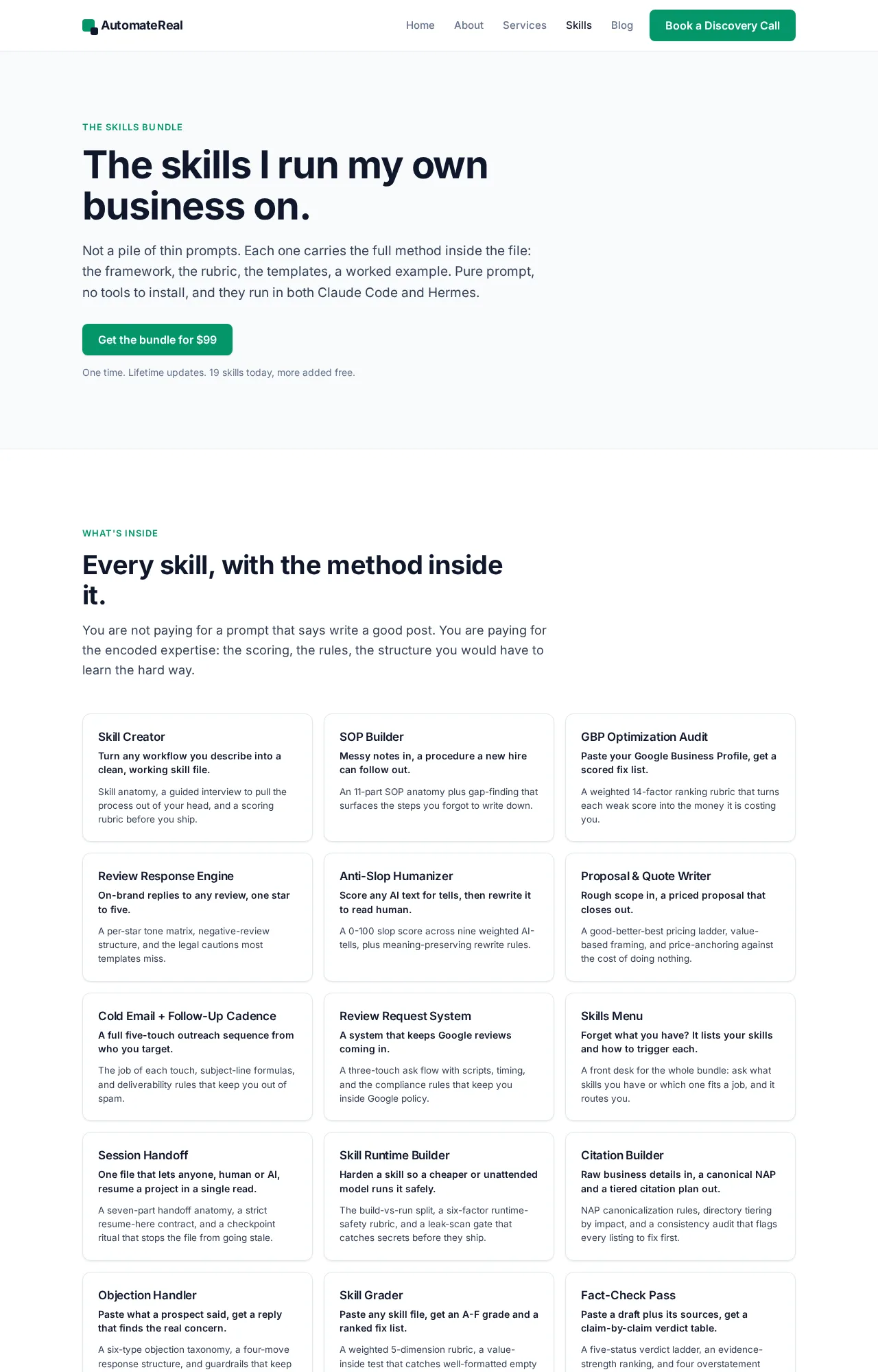
The skills page lists the workflows already built and running.
If you want help choosing that first job, a discovery call maps it in about 30 minutes. The AI services page covers the build when you would rather hand the whole thing over.