Best AI Agents for Personal Use in 2026 (Tested Picks)
The best AI agents for personal use in 2026, ranked by what they actually finish: real prices, app access, memory and what to skip.
Your inbox has 40 unread messages, a renewal due Friday, and a message from your landlord you keep meaning to answer. The chatbot you pay for answers questions and touches none of it.
Most roundups rank personal AI tools by feature count. This one ranks by what finished a job, and it prints the price next to every pick. I run automations for a living, so the test is simple. Hand the tool a real task and see whether it comes back done.
The best AI agents for personal use in 2026 are a general assistant plus one specialist. ChatGPT and Claude lead that shortlist, with Lindy for mail routines and Zapier for app wiring filling the gaps.
TL;DR
- Start with the assistant you will open daily, then add a specialist for one job.
- Prices were read live on 19 October 2026, and the entry tier is $9.99 to $29.99 a month.
- Free tiers handle chat and break at scheduled jobs or app access.
- The setting that matters most is what the agent may send without asking you.
What counts as an AI agent for personal use, and which ones actually finish a task?
An AI agent for personal use takes a goal, plans the steps, and acts inside your own apps. A chatbot answers a question. An agent finishes a job. Most products sold as agents stop one step short, at a draft you still have to send.
The mechanism behind that gap is function calling. The model calls a tool, reads what came back, and picks the next step. Vendors call this loop agentic AI. The agents that work all run it against your mail, your calendar, or a browser tab.
The personal jobs worth handing over look like this:
- Clearing an inbox and drafting the 6 replies that matter.
- Moving a flight change through an airline site and into your calendar.
- Chasing a refund or a renewal you keep forgetting.
- Planning a trip and holding the dates.
Connectors now follow one standard. MCP is short for Model Context Protocol, an open-source standard for connecting AI apps to outside data and tools (MCP docs). Claude, Gemini and Lindy read it today, so one connector can serve more than one assistant. The business-side ranking of the same category lives in top AI agents compared.
Which AI agents are best for personal use in 2026?
One general assistant covers most personal work, and ChatGPT is the broadest of the bunch. Claude takes long documents and Gemini fits a Google household, with specialists below for everything else.
Here is the shortlist with the price, the reason it wins, and the place it fails. The three general assistants come first because most people should choose among them.
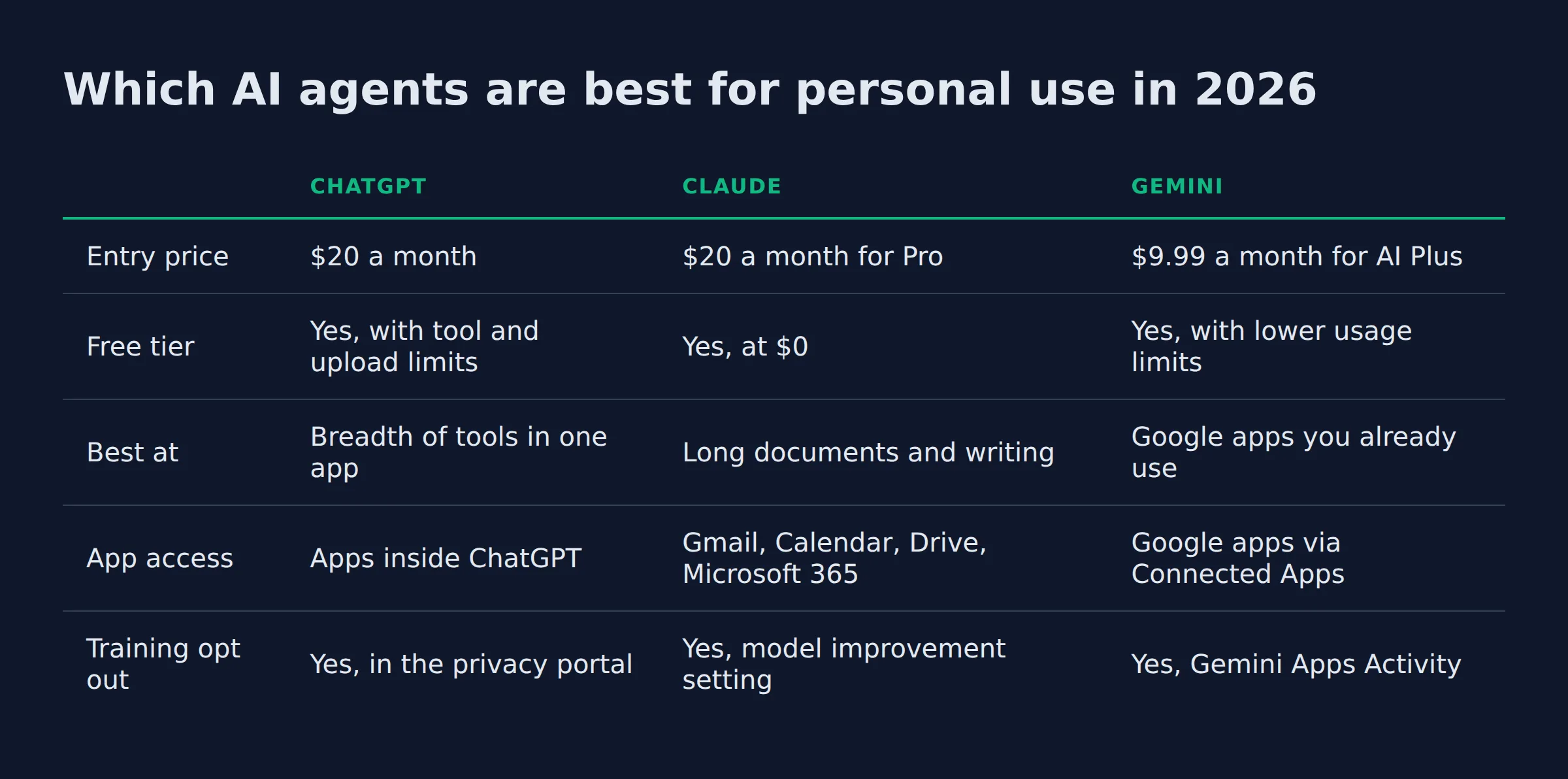
| ChatGPT | Claude | Gemini | |
|---|---|---|---|
| Entry price | $20 a month | $20 a month for Pro | $9.99 a month for AI Plus |
| Free tier | Yes, with tool and upload limits | Yes, at $0 | Yes, with lower usage limits |
| Best at | Breadth of tools in one app | Long documents and writing | Google apps you already use |
| App access | Apps inside ChatGPT | Gmail, Calendar, Drive, Microsoft 365 | Google apps via Connected Apps |
| Training opt out | Yes, in the privacy portal | Yes, model improvement setting | Yes, Gemini Apps Activity |
ChatGPT
- Best for: a first agent that touches mail, files, images and the web in one place.
- Price: $20 a month for Plus, on top of a free plan that caps tools and uploads, per OpenAI’s plan page.
- What it adds: custom GPTs start at the $20 tier. Scheduled tasks are available on Go and above, so a recurring chore can run on a timer, per the pricing page.
- Where it breaks: Pro is sold in 3 usage tiers and the page shows no single number for it. Budget Pro as a moving cost.
Claude
- Best for: long documents, careful writing, and a memory you can actually read.
- Price: read live on 19 October 2026 from Claude subscription pricing:
- Free tier: $0.
- Pro: $20 a month.
- Max: $100 or $200 a month, depending on the tier.
- Team: $25 per seat.
- What it adds: connectors for Gmail, Google Calendar, Drive, Slack and Microsoft 365, per Anthropic’s connector guide.
- Where it breaks: the usage ceiling is the real product. Long agent runs push you to Max. The Claude subscription pricing breakdown covers where the caps bite.
Gemini
- Best for: a household already living in Gmail, Photos and Docs.
- Price: Google AI Plus is $9.99 a month and AI Pro is $19.99, per Google’s plan page.
- What it adds: Connected Apps lets Gemini read Google apps and reach MCP server tools from one settings screen.
- Where it breaks: your control is split in two. Google says turning off Keep Activity does not stop chats being used to make anonymized improvement data, per its Gemini Apps notice.
Microsoft Copilot
- Best for: anyone whose workday is Outlook, Word and Teams.
- Price: Microsoft 365 Personal is $9.99 a month and Premium is $19.99, per Microsoft’s plan comparison.
- What it adds: Copilot runs inside Word, Excel, PowerPoint, Outlook and OneNote, so there is nothing new to open.
- Where it breaks: the Copilot you get depends on the tier. Microsoft’s standalone Copilot Pro page returned a 404 when I checked on 19 October 2026.
Perplexity
- Best for: research where you want the source next to the claim.
- Price: Pro is $20 a month and Max is $200, per the App Store listing.
- What it adds: answers arrive with citations, which makes it the cheapest fact-checker on this list.
- Where it breaks: it researches. It does not touch your calendar.
Manus
- Best for: a multi-step job you hand off and walk away from.
- Price: Basic is $19 a month and Plus is $39 on the App Store listing, while the site sells credit pools from 4,000 credits a month.
- What it adds: 20 concurrent tasks and 20 scheduled tasks on a paid plan, per Manus pricing.
- Where it breaks: credits meter everything, and long jobs burn through them fast.
Lindy
- Best for: email and calendar routines that repeat every week.
- Price: $50 in free credits for 7 days, then team credits from $29.99 a month for 3,000, per Lindy pricing.
- What it adds: memory lives in plain files you can open and edit, and writes can wait for your approval, per Lindy’s site.
- Where it breaks: it is a credit meter too. A busy inbox eats the pool.
Zapier
- Best for: wiring an agent to the apps you already pay for.
- Price: free at $0 with 100 tasks a month, Professional from $19.99, Team from $69, per Zapier pricing.
- What it adds: more than 9,000 app connections, the widest reach here.
- Where it breaks: it moves data between apps. The judgment stays with you.
The five checks behind this list
Five checks set the order, and price was only one of them.
- Does it finish the task: some agents stop at a draft you still have to send, which is a chat product with extra steps.
- What it reaches: live mail, calendar and file access counts for more than a smarter model.
- Real monthly cost: the tier you need once seats and usage caps land, not the entry price.
- Memory and control: what it keeps between sessions, how large its context window is, and whether you can open and delete what it knows.
- Data terms: whether your chats train the model, and where the off switch sits.
I read every price on 19 October 2026 from the vendor page or the app store listing, and each one is named above. Where a vendor hides the number, the entry says so instead of guessing.
What does each one cost, and is the free tier enough?
Entry prices run from $9.99 to $29.99 a month. ChatGPT Plus, Claude Pro and Perplexity Pro cost $20. Google AI Plus and Microsoft 365 Personal start at $9.99. AI Pro and Microsoft 365 Premium are $19.99 upgrades. Free tiers break at volume or app access. One paid seat is enough.
| Tool | Entry price | Free tier | Email and calendar | Phone app |
|---|---|---|---|---|
| ChatGPT | $20 (Plus) | Yes, capped tools and uploads | Apps inside ChatGPT | Yes, iOS and Android |
| Claude | $20 (Pro) | Yes, at $0 | Gmail, Calendar, Drive | Yes |
| Gemini | $9.99 (AI Plus) | Yes, lower limits | Google apps | Yes |
| Copilot | $9.99 (M365 Personal) | No standalone free plan | Outlook and Teams | Yes |
| Perplexity | $20 (Pro) | Yes | Not verified in this check | Yes |
| Manus | $19 (Basic) | Credit allowance on signup | Not verified in this check | Yes |
| Lindy | $29.99 (3,000 credits) | $50 credits for 7 days | Gmail, Drive, Calendar | No iOS app found in this check |
| Zapier | $19.99 (Professional) | Yes, 100 tasks a month | Gmail and Calendar apps | Not verified in this check |
Free tiers fail on two things: volume and reach.
- ChatGPT free limits uploads, images, voice and deep research.
- Claude free runs web search, file creation and code without a card.
- Gemini free gives 4 times lower usage than a Google AI plan, per Google’s plan page.
- Zapier free stops at 100 tasks a month.
Data terms decide more than price for most people.
- OpenAI may train on consumer chats, and the switch sits in its privacy portal under “do not train on my content”, per its data notice. Temporary Chat is excluded.
- Anthropic keeps de-identified data for up to 5 years in training pipelines once model improvement is on, and can turn it off at any time, per its privacy policy.
- Google puts the control in Gemini Apps Activity, where you review, delete and set auto-delete, per the Gemini Apps notice.
- Lindy states that your data is not used to train models, on its site.
Which agents connect to your email, calendar and files?
Claude and Lindy reach Gmail, Google Calendar and Drive directly. Gemini reaches Google apps through Connected Apps, and Zapier reaches 9,000+ apps. Copilot works inside Outlook and Teams. ChatGPT’s app list sits inside the app, so check it there before you pay.
Reach decides whether one agent can be your only agent, so it is worth checking before the price.
Claude’s connectors cover Gmail, Google Calendar, Drive and Microsoft 365. They also reach Slack and GitHub. Custom connectors are remote MCP servers that Anthropic reaches from its own cloud, per the connector guide. That detail matters if your files sit behind a home firewall.
Gemini’s Connected Apps screen carries both the Google apps and a list of MCP server tools it may call, per Google’s Gemini Apps notice. One screen, one permission list.
Lindy lists Gmail, Drive and Calendar, plus 1,500 more apps. It can also drive a browser on a paid plan, per its site. It is the closest thing here to a personal assistant app rather than a chat window.
Copilot reads Outlook, Word and OneNote because it runs inside them, per Microsoft’s plan page. It is the only option here that needs no connection step at all.
OpenAI’s connected apps article would not load for me today. Treat ChatGPT’s Gmail and Calendar support as the one thing to verify inside the app before you buy.
How do you set one up without a technical background?
Pick one task you repeat weekly, connect one app, and start the agent in draft-only mode. Anything that leaves your account gets an approval step. Setup takes minutes. Deciding what it may never touch takes longer, and that decision is the one that keeps you out of trouble.
The permission ladder is the whole job. I use 4 rungs, and most people should climb them one per week.
- Rung 1, draft: the agent writes, you send. Nothing can go wrong, and you save the typing.
- Rung 2, approve: it prepares the action and waits for a tap. This rung fits mail and calendar.
- Rung 3, notify: it acts, then tells you what it did. Good for filing, logging and reminders.
- Rung 4, unattended: it acts and reports weekly. Only for jobs where a wrong move costs nothing.
Move up a rung only after a week with zero corrections.
Then write the refusal list. Mine has 4 entries:
- No banking.
- No password manager.
- No medical records.
- No messages to family.
Anything on that list stays human forever. The agent gets told once, in plain language, and the rule holds. Write the list before you connect the first app, because that is the one part of setup that gets harder to change after a bad send.
Which one fits you?
The best agent for personal productivity is the one already inside the apps you open. Solo users start with ChatGPT, Google households with Gemini, Microsoft households with Copilot, and heavy document work with Claude. Pick one, then add a specialist for the one job it cannot do.
The pick changes with your week, so here is one line for each case.
- One app, solo: ChatGPT Plus. It covers the most ground for $20.
- Long documents and careful writing: Claude Pro. The connector list and the writing are the draw.
- Google household: Gemini with Google AI Pro at $19.99. It already sees your mail and photos.
- Microsoft household: Copilot inside Microsoft 365 Personal at $9.99.
- Research with sources: Perplexity Pro at $20.
- Email and calendar routines: Lindy, starting from its $50 credit trial.
- Tasks you hand off and walk away from: Manus Basic at $19.
- Wiring 3 or more apps: Zapier, from $19.99.
- Privacy first, self-host: Jan.ai or AnythingLLM on your own machine.
The specialists the other lists name
The roundups that rank for this keyword name these tools too. Here is what each one does, and why none of them takes a top spot.
- Reclaim: an AI calendar that finds focus time and defends it from new meetings (reclaim.ai).
- Motion: projects, tasks, calendar and meetings in one app that replans your day (Motion).
- Superhuman: an email client with AI built into the inbox (Superhuman).
- Granola: meeting notes taken without a bot joining the call (Granola).
- Notion AI: search and chat over your own pages inside Notion (Notion AI).
- DeepSeek: a free chat app from a lab that publishes open models (DeepSeek).
- HuggingChat: one chat window for community models (HuggingChat).
Each one is good at a single job. None of them plans and finishes a whole personal task, which is why they sit behind the general assistants. Pi and Meta AI also appear on those lists, and both blocked my check today, so neither is ranked here.
Does a free or open-source agent beat the paid ones?
Free and open-source agents run models on your own machine. Jan.ai and AnythingLLM cost nothing, PyGPT uses your own API keys, and Leon is open source with a 2.0 preview. They win on privacy and lose on convenience, because you become the maintenance crew.
Jan.ai is free and open source, with more than 6 million downloads, per its site. It runs open models locally on Mac, Windows and Linux, and it can point at a paid model when a local one is not good enough.
AnythingLLM runs entirely on your computer with no accounts and no API keys, and every document you add becomes knowledge that never leaves the device, per its site. It uses retrieval, often called RAG, to feed your own files to the model at question time. It is also the easiest local-first option to hand to a non-technical family member.
PyGPT ships as a desktop assistant that uses your own provider credentials, and local models served through Ollama need no keys at all, per its repo. Leon is MIT licensed with 17.6k GitHub stars, and its README warns that 2.0 is a developer preview with unfinished docs, per the repo.
The catch is you. A local model needs a machine with enough memory, and every connector you want is a setup you maintain. Buy the paid tool when time matters more than control.
AutomateReal skills
The receipts from the workflow I run every day
I have not run a 14-day personal test, so here is the dated log I do have. My own outreach agent has written 8,949 run records since 16 July 2026, all the way through 19 October. It confirmed 3,285 submissions and stopped short on 3,646.
That workflow is my own outreach. The failures below are the same ones you will hit when an agent moves a flight or renews a domain. A page the agent cannot read is a page you cannot hand over.
| What the agent did | Run records | Share of runs |
|---|---|---|
| Filled and submitted the form, confirmed | 3,285 | 36.7% |
| Submitted, no confirmation came back | 2,018 | 22.5% |
| Stopped before a confirmed submission | 3,646 | 40.7% |
Where those 3,646 stops came from:
- 1,697 pages had no form to fill at all.
- 721 runs hit an error or a timeout.
- 445 pages threw a captcha.
- 409 pages had a form the agent could not map.
- 259 pages had no submit button.
- 115 submissions failed after the click.
The 2,018 unconfirmed runs are the ones I watch. The agent acted and could not prove what happened, which is worse than a clean stop, because you never learn what went out.
The bill is the last receipt. One assistant at $20 plus one specialist at $19 to $39 is a $39 to $59 month, which is the whole budget this page recommends.
FAQ
Are free AI agents good enough for personal use?
Free tiers handle chat, short research and file reads. They fail on scheduled jobs and app connections, which is where an agent earns its keep. Start free, then pay when a job needs a timer.
Can an AI agent book appointments or send email for me?
Some can. Lindy connects to Gmail and Google Calendar, and Claude reaches the same apps through connectors. Booking still depends on the other side, since a phone line or a form can stall the agent.
Is my personal data used to train the model?
Often, and the switch is yours to flip. OpenAI trains on consumer chats unless you opt out. Anthropic keeps de-identified data for up to 5 years when model improvement is on. Google’s control is Gemini Apps Activity.
Do I need to know how to code to set one up?
No. Connectors, permissions and approval steps are settings. Code enters when you want a custom action no connector covers, and most personal jobs never reach that point.
Which of these works on iPhone and Android?
ChatGPT, Claude, Gemini, Copilot, Perplexity and Manus all ship phone apps. Apple Intelligence adds built-in features on iPhone 16 and later, per Apple Support. Lindy runs from the browser and Slack.
How much should one person budget per month?
One paid seat at $20 covers most people. A specialist tool adds $19 to $39 on top. A realistic personal budget is $20 to $60 a month, and anything above that needs a job that pays for itself.
What is the difference between an AI assistant and an AI agent?
An assistant answers and suggests. An agent plans, acts and reports back. The practical test is whether the tool can change something without you, such as sending the mail or holding the date.
Which agent is best for privacy if I will self-host?
AnythingLLM runs entirely on your computer with no accounts. Jan.ai runs open models locally for free. PyGPT adds your own API keys. All 3 trade convenience for control.
Are there sites like ChatGPT that do the same job?
Yes. Claude, Gemini and Perplexity each run their own site and app. The difference that matters is app access, not the domain name, so pick with the table above.
Start with one agent and one task
The pattern that works is boring. One assistant you pay for, one specialist tool, one rung of the ladder at a time.
Pick the job you have done 3 times this week and still dread. Give it to one agent in draft mode. If the draft is good twice, add the approval step. If it is bad, cancel and try the next tool, which costs you one month and one evening.
If you want help finding the first workflow worth automating, a discovery call maps it in about 30 minutes. The AI services page explains how the build works when you would rather not run the ladder alone.
AutomateReal services