Claude Code Plugins vs Skills: What's the Difference?
Claude Code plugins vs skills: what each one is, what it costs in context, how you install both, and which one to build first for your team.
Every plugin you enable is part of every session, even the days you never touch it. Every skill you write sits on disk until a task matches its description. That gap decides which one you should build first.
A Claude Code skill is one folder with a SKILL.md file that teaches Claude one workflow. Claude reads it only when a task matches its description. A plugin is a directory with a manifest that packs skills, agents, hooks, and MCP servers into one install. Skills shape one repo. Plugins move a setup between machines.
TL;DR
- A skill is a folder with a
SKILL.mdfile. A plugin is a directory with a manifest that bundles components. - A plugin costs context on every turn. A skill costs one description until it fires.
- You install a skill by copying a folder. You install a plugin with
/plugin, at user, project, or local scope. - Write the skill first. Package the plugin when someone else has to install it.
What is a Claude Code skill, and what is a Claude Code plugin?
A skill is one folder holding a SKILL.md file with YAML frontmatter and instructions. A plugin is a directory with a .claude-plugin/plugin.json manifest that packs 5 kinds of component, from skills to MCP servers, into a single install.
The skill is the simpler object, so start there. The folder name becomes the command you type. Set a name field in the frontmatter and that wins instead. The description tells Claude when to load the skill, per the skills docs. Scripts and reference files can sit beside the SKILL.md, which is why a skill carries more than a prompt.
The plugin is a container. Anthropic calls a Claude Code plugin a directory of components that loads as one unit. The manifest gives the plugin a name, a version, a description, and metadata. An enabled plugin can add any mix of:
- Skills, which you run as a command or Claude loads on a match.
- Agents, which are subagent definitions Claude can delegate to.
- Hooks, which fire at lifecycle points such as after every edit.
- A hooks module, which the docs call a mod.
- MCP servers, which connect Claude to outside tools.
Only plugin.json goes inside .claude-plugin/. The skill sits at skills/<skill-name>/SKILL.md, next to that folder. No component type is required, so the smallest real plugin is one skill.
A skill is a file Claude may open. A plugin is a box of files your team can install.
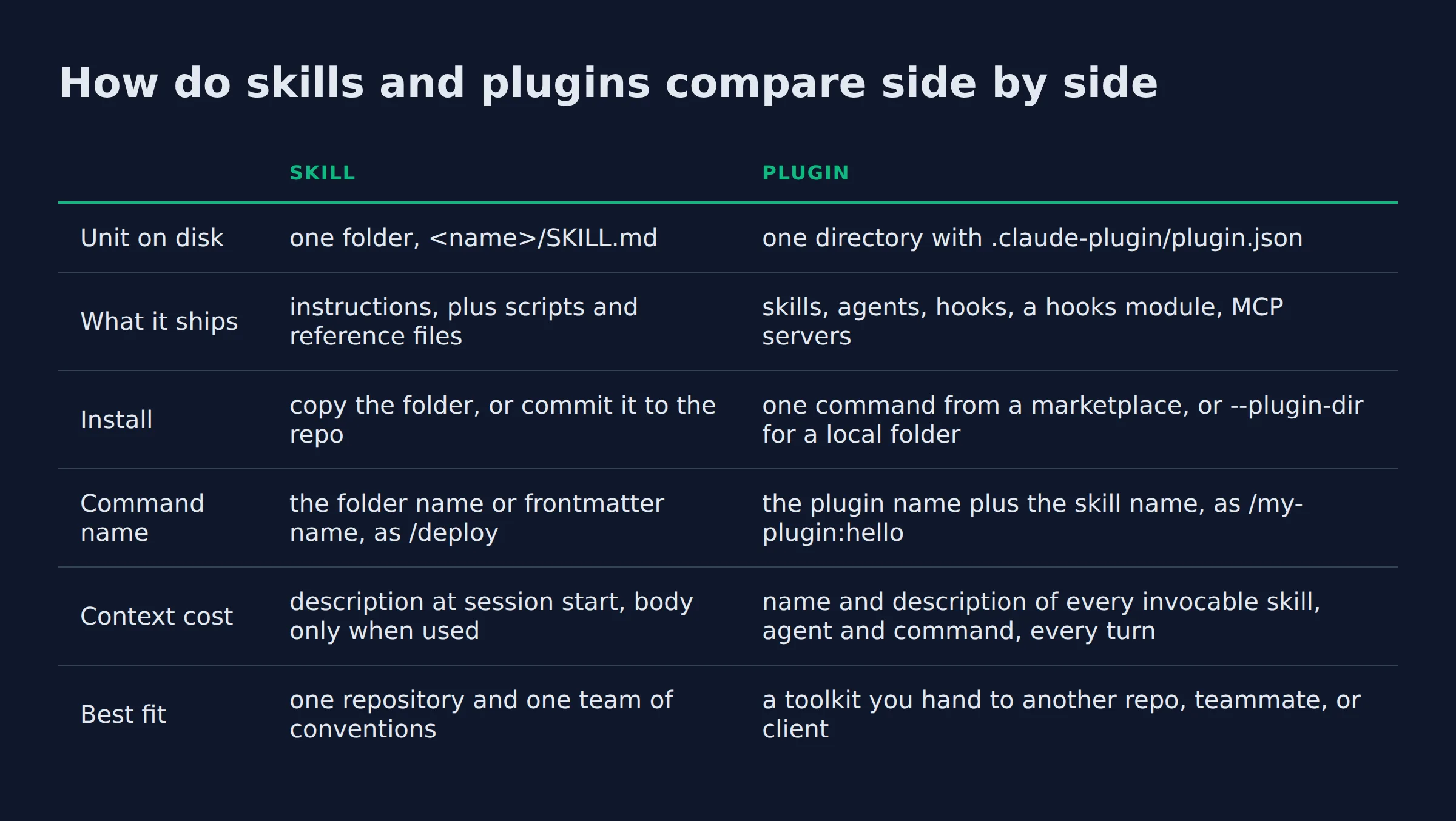
How do skills and plugins compare side by side?
A skill changes what Claude knows inside one repo or on one machine. A plugin changes what a group of people get from one install, including the code and servers the setup needs to run.
Every cell in this table comes from the official docs.
| Skill | Plugin | |
|---|---|---|
| Unit on disk | one folder, <name>/SKILL.md |
one directory with .claude-plugin/plugin.json |
| What it ships | instructions, plus scripts and reference files | skills, agents, hooks, a hooks module, MCP servers |
| Install | copy the folder, or commit it to the repo | one command from a marketplace, or --plugin-dir for a local folder |
| Command name | the folder name or frontmatter name, as /deploy |
the plugin name plus the skill name, as /my-plugin:hello |
| Context cost | description at session start, body only when used | name and description of every invocable skill, agent and command, every turn |
| Best fit | one repository and one team of conventions | a toolkit you hand to another repo, teammate, or client |
The second table covers the details you notice after a month of ownership.
| Skill | Plugin | |
|---|---|---|
| Where it lives | ~/.claude/skills/, .claude/skills/, or a --add-dir folder |
~/.claude/plugins/ after install |
| Who it is enabled for | whoever has the folder | user, project, or local scope |
| Update path | git, whenever you pull | a marketplace update, with the version in the manifest |
| Footprint check | disable-model-invocation: true, or skillOverrides |
a context cost estimate in the listing, the “Not used recently” group, claude plugin disable |
| Price | no separate price listed, it runs on your plan | no separate price listed, same plan |
| Ceiling | cannot install hooks or servers of its own | installs hooks and servers that run as you |
The difference that bites at work is distribution. A skill stays where you put it. A plugin arrives with a version number and can run code.
How we compared these
I read the official docs pages end to end, then measured the skill folders I actually run. Every claim here comes from a doc URL or a number you can check in your own shell.
The ranking pages disagree, and that is worth knowing before you trust one. A March 2026 post that ranks for this pair describes a skill mainly as a file in .claude/commands/ and calls CLAUDE.md a skill layer. The current docs call command files the older format that still works, and ask you to prefer a skill for new work.
The other ranking post, from ayautomate, gets the definitions right and stops before the details that cause trouble. It has no disk path for installed plugins, no install scopes, and no measured context cost.
Both pages explain the idea. I’ll start where they stop, which is the bill.
Where docs and ranking posts disagree, the docs win, because Anthropic ships the loader.
Which one costs more context in every session?
A plugin costs more in context. Every skill, agent, and command it ships keeps its name and description in front of Claude on every turn. A skill keeps one description there until a task matches it.
Anthropic states the consequence plainly. An enabled plugin is part of every session, including the sessions where you never use it. Those tokens count toward your usage, and they leave less room in the context window.
Skills load in two stages. Descriptions arrive at session start and the full content loads only when the skill is used, which the context cost table rates as low. MCP servers load tool names at start and schemas on demand. CLAUDE.md loads on every request.
I measured what that looks like on my own setup, because the abstract version never convinced me. The AI SEO team that wrote this post is 5 skill folders, and together they hold 5,563 words of instructions.
Only a slice of that is ever in context. The copywriter skill in that team has a 58 word description and a 1,138 word body. The per-turn cost is roughly 5 percent of the folder. The rest waits on disk until a brief arrives.
That ratio is the case for skills. A plugin cannot make the same promise, because its names sit in front of Claude whether you use them or not.
A plugin’s cost is paid every turn, including the turns where you never open it.
How do you install a skill versus a plugin?
Copy a skill folder into ~/.claude/skills/ or commit it to .claude/skills/. Install a plugin with /plugin, pick a user, project, or local scope, and the files land in ~/.claude/plugins/.
The skill path is a copy or a commit. Personal skills in ~/.claude/skills/ reach every project on that machine. Project skills in .claude/skills/ reach the repo once you commit them. A folder passed with --add-dir covers a session that lives outside the project.
The AutomateReal skills page, where a folder of skills gets handed over.
A plugin comes from a marketplace, which is a repo or directory with a .claude-plugin/marketplace.json file that lists plugins and where to fetch each one. In a session, /plugin opens a Discover tab that lists the plugins from the marketplaces you added. You install by name, as in commit-commands@claude-plugins-official.
Claude Code adds Anthropic’s official marketplace on your first interactive session, unless a policy blocks it. It does not add the community marketplace for you, and both names are reserved for repos under github.com/anthropics/.
The install scope is the decision most people skip:
- User scope covers you in every project on that computer.
- Project scope covers everyone in the repo through the committed
.claude/settings.json, though each person still installs it. - Local scope covers you in that repo only.
Marketplace names come in 3 tiers. claude-plugins-official and claude-code-plugins are official, claude-community is the community tier, and anything else is third party. Third-party plugins can run code with your privileges, so read the plugin before you install it, as the docs insist. If you want the inventory side of this, Anthropic’s official plugin marketplace is the tour.
Scope is the real control on a plugin. Project scope reaches every teammate, and local scope reaches nobody but you.
When is a skill enough, and when do you actually need a plugin?
A skill is enough when the work stays on one machine or in one repo and you maintain it. You need a plugin when another person has to install it, or when the setup ships hooks or MCP servers.
Anthropic’s own rule lands close to that. Skills, subagents, hooks, and MCP servers all work on their own, per the plugins docs. Reach for a plugin when you want several of them packaged as one unit, or when you want updates from a marketplace.
A skill folder is enough when:
- One repo, one set of conventions.
- You are the only person editing it.
- The work is instructions and reference files.
- You installed it once and forgot about it.
It is plugin time when:
- A teammate needs the same setup on their laptop.
- The setup needs hooks or an MCP server to run.
- You want versions and updates instead of a pasted chat message.
- The same setup lands in 3 or more repos.
Small teams stop at the skill folder more often than the plugin pages suggest. My own pipeline stays as folders for that first reason. I am the only one who edits it, and it moves between machines as part of a git repo.
One edge case is worth knowing before you commit. A skill folder can become a plugin. Add a .claude-plugin/plugin.json to the folder and Claude Code loads it as <name>@skills-dir, per the skills docs. It keeps its own agents, hooks, and MCP servers. In a project the workspace trust dialog comes first. An administrator can also block it.
If you have not written the skill yet, start with what a Claude Code skill is. A plugin of undocumented folders is a packaging problem you made for yourself.
Who installs it decides the format. A setup only you install can stay a folder.
The 3 checks I run before packaging anything
I run 3 checks before a skill folder becomes a plugin. Almost every folder I own fails the first one, and that is the right outcome.
- Does anyone else need it? If the only user is my own machine, the folder stays a folder.
- Does it ship code? Hooks and MCP servers change your sessions. Instructions alone do not need a container.
- Who pays the context? Every enabled plugin adds names to every turn. A plugin of 12 skills bills you for all 12.
I have not published a plugin, so the walkthrough below is the documented path and not a war story.
That is also a fair test of whether you need one. If your answer to question one is “nobody”, you already have your verdict.
The audit is 3 questions, and the first one settles most cases.
How do you wrap a working skill into a plugin?
Add .claude-plugin/plugin.json, move the skill to skills/<skill-name>/SKILL.md, then run claude --plugin-dir ./<plugin-name> to test it. No marketplace is needed until someone else has to install it.
The manifest has one required field, name, plus the fields the docs recommend for a plugin anyone else will read.
{
  "name": "my-plugin",
  "description": "The workflows my team repeats every week",
  "version": "1.0.0",
  "author": { "name": "Your Name" }
}
Then the folder layout:
my-plugin/
  .claude-plugin/plugin.json
  skills/hello/SKILL.md
name becomes the prefix on every skill and agent the plugin provides. A skill named hello inside my-plugin runs as /my-plugin:hello, so 2 plugins can each ship a hello skill without a collision, per the create page.
Validate before you run anything. claude plugin validate ./my-plugin prints the manifest path it checked and either a pass or the field to fix. Then claude --plugin-dir ./my-plugin loads it for one session, with no install and no marketplace.
A plugin can also be a single skill at its root, at my-plugin/SKILL.md, which runs as /my-plugin:review. One file and one manifest is a complete plugin.
If the skill already lives under .claude/, copy the directory to the plugin root instead of rewriting it. One trap comes with that copy. Hooks carry no name prefix, so a hook in both your settings file and hooks/hooks.json fires twice on every event until you delete the original.
Skills and agents do get the prefix, so /deploy and /my-plugin:deploy both work while the old copy is still there.
The first plugin is one JSON file and a folder move. No marketplace, no publish step.
Which one fits your situation?
Start with a skill in almost every case. Add a plugin when the setup has to reach another person or another machine, or when it needs hooks or servers to run.
| Situation | Start with | Why |
|---|---|---|
| One repo, you maintain it | a skill folder in the repo | no install step and no version to keep |
| The same setup across your own projects | a skill in ~/.claude/skills/ |
personal skills reach every project on that machine |
| A teammate needs it on their laptop | a plugin at user scope | one install command, and updates come from the marketplace |
| Hooks or an MCP server ship with it | a plugin | a skill cannot install code or a server |
The first 2 rows are about knowledge and the last 2 are about machinery.
The AutomateReal services page, for the setups that need more than a folder.
Knowledge travels in a folder. Machinery needs a container.
For a managed version, see the skills bundle.
FAQ
Do I still need plugins if I already have skills?
No. Skills work without a plugin. A skill in ~/.claude/skills/ is available in every project on that machine, per the plugins docs. Subagents, hooks, and MCP servers don’t need one either. A plugin earns its place when the setup has to travel, or when it needs hooks and servers installed as one unit.
Are Claude Code plugins free?
The docs list no separate price, so a plugin runs on your Claude Code plan. The real cost is context and usage, because the names and descriptions of what it ships count toward your usage on every turn. That cost is why the footprint check exists.
Can a plugin contain just one skill?
Yes. No component type is required, and Anthropic’s walkthrough builds a plugin whose only component is a greeting skill. A single skill at the plugin root works too, at my-plugin/SKILL.md.
What happens when two skills have the same name?
Location decides. Enterprise beats personal, personal beats project, and a skill beats a file in .claude/commands/, per the skills docs. A plugin skill runs under its prefix, so /deploy and /my-plugin:deploy both load. Two names are reserved. A folder named synced in any capitalization never loads, because Claude Code downloads claude.ai skills there. A folder or command file named anthropic-skills does not load either.
Is a plugin the same thing as an MCP server?
No. An MCP server is one component a plugin can carry. The name stands for Model Context Protocol, and the server is the piece that connects Claude to outside tools. A plugin can also carry skills, agents, hooks, and a hooks module, and most plugins mix several types. An MCP server on its own works with no plugin at all.
Do skills and plugins work in cloud sessions or on claude.ai?
Partly. Personal skills in ~/.claude/skills/ do not load in Cowork or cloud sessions. Project skills do not load in cloud threads, though skills enabled on your claude.ai account do. A cloud session, including claude.ai/code in a browser, does not load the plugins from your local settings.
If you want a second opinion on your list, send me the workflows you repeat every week. I will tell you which ones should be a skill, which need a plugin, and which belong in CLAUDE.md. You can also check the work against the skills bundle I run my own setup on, all skills for $99.