Academic Research Skills for Claude Code (2026 Guide)
Academic research skills for Claude Code: install the academic-research-skills suite, see what each stage does, what it costs, and where it still fails.
A paper draft lands in your terminal in one sitting. The prose reads clean. Two of the references were never written.
Academic research skills for Claude Code are skill folders that follow the Agent Skills format. They move a paper through literature search, drafting, peer review, citation checking, and formatting inside your terminal. The best known set is academic-research-skills by Cheng-I Wu: 4 skills plus an orchestrating pipeline that stops for your approval at every stage.
Most write-ups of this suite are the maintainer’s README or a reseller guide that still prints an older licence. This page reads the repo, the docs, and the papers the repo cites, then says where the pipeline stops.
TL;DR
- academic-research-skills is a 5-skill suite for Claude Code. Two plugin commands install it, and it walks a paper from a research question to an APA 7.0 PDF.
- The licence is CC BY-NC 4.0, so it is free for academic use and blocked for commercial client work. A guide ranking for this term still calls it MIT.
- Model time runs about US$3 to US$7 for a 15,000-word paper. The repo labels its own review output
NOT_CALIBRATED, so read a decision letter as advice.
What are academic research skills for Claude Code?
Academic research skills for Claude Code are folders built on the SKILL.md format, each one teaching Claude a single research job. Claude reads only the name and description until a task matches, then loads the full instructions for that job.
The format is small. You get a folder, one SKILL.md, and any reference files or scripts the procedure needs. Claude Code keeps the body out of context until the skill is used, so a long reference file sits on disk until it earns the tokens, per the skills docs.
Skills follow the Agent Skills open standard, which the same docs say keeps them portable across tools. That matters for research work. The same folder travels between machines and labmates.
Cheng-I Wu’s repo applies the format to the full paper cycle. It ships 5 skills: 4 core ones plus a screening tool for systematic reviews. The best Claude Code skills roundup covers the wider shortlist this sits in.
A skill is a folder with instructions, and that format is what makes a research workflow portable.
How do you install academic research skills for Claude Code?
Install it as a plugin: run /plugin marketplace add Imbad0202/academic-research-skills, then /plugin install academic-research-skills. You need a recent Claude Code build and an ANTHROPIC_API_KEY. Afterwards, /ars-plan starts a guided session. The repo calls the whole install a 30-second job.
Pandoc is optional and only matters if you want DOCX. A PDF in APA 7.0 needs tectonic plus the Source Han Serif TC font. Without either, you still get Markdown. The general how to add skills to Claude Code guide covers the copy-a-folder route.
That choice shows up at submission, not at install. Install Pandoc first and test the export on a 2-page draft.
On claude.ai or Claude Desktop, add the repo under Customize, then Plugins, then add a marketplace. Hooks and plugin agents do not run in plain chat there. Release 3.24.1 shipped on 2026-11-02 to repair that path, which had been loading none of the 5 skills per the changelog.
To test the install, run /ars-lit-review "your topic" for a single pass. It is the cheapest way to see the output shape before you commit to a paper.
Two plugin commands install it, and Pandoc plus tectonic decide which file formats you can hand in.
The licence line that decides who can use this
The suite is CC BY-NC 4.0, which allows attribution-based sharing and blocks commercial use. A third-party guide ranking for this term still calls the project MIT, and that error decides whether an agency can build a paid deliverable on it.
The repo’s badge and its Licence section both say CC BY-NC 4.0. Non-commercial means a paper you sell, or client work billed under a contract, falls outside the grant.
Version drift is the other half of the problem. That guide pins the project at v3.7.0 from May 2026 and repeats an MIT licence, which the repo no longer shows. The current release is v3.24.1, published 2026-11-02.
Licence terms are the first thing I read, because I sell a skills bundle for $99 and the terms decide what a buyer may do with it. A research tool with a non-commercial licence changes the plan for anyone charging by the paper.
The AutomateReal skills page: the bundle whose terms I check first against any tool licence.
A non-commercial licence decides this before any question about output quality comes up.
What does each stage of academic-research-skills actually do?
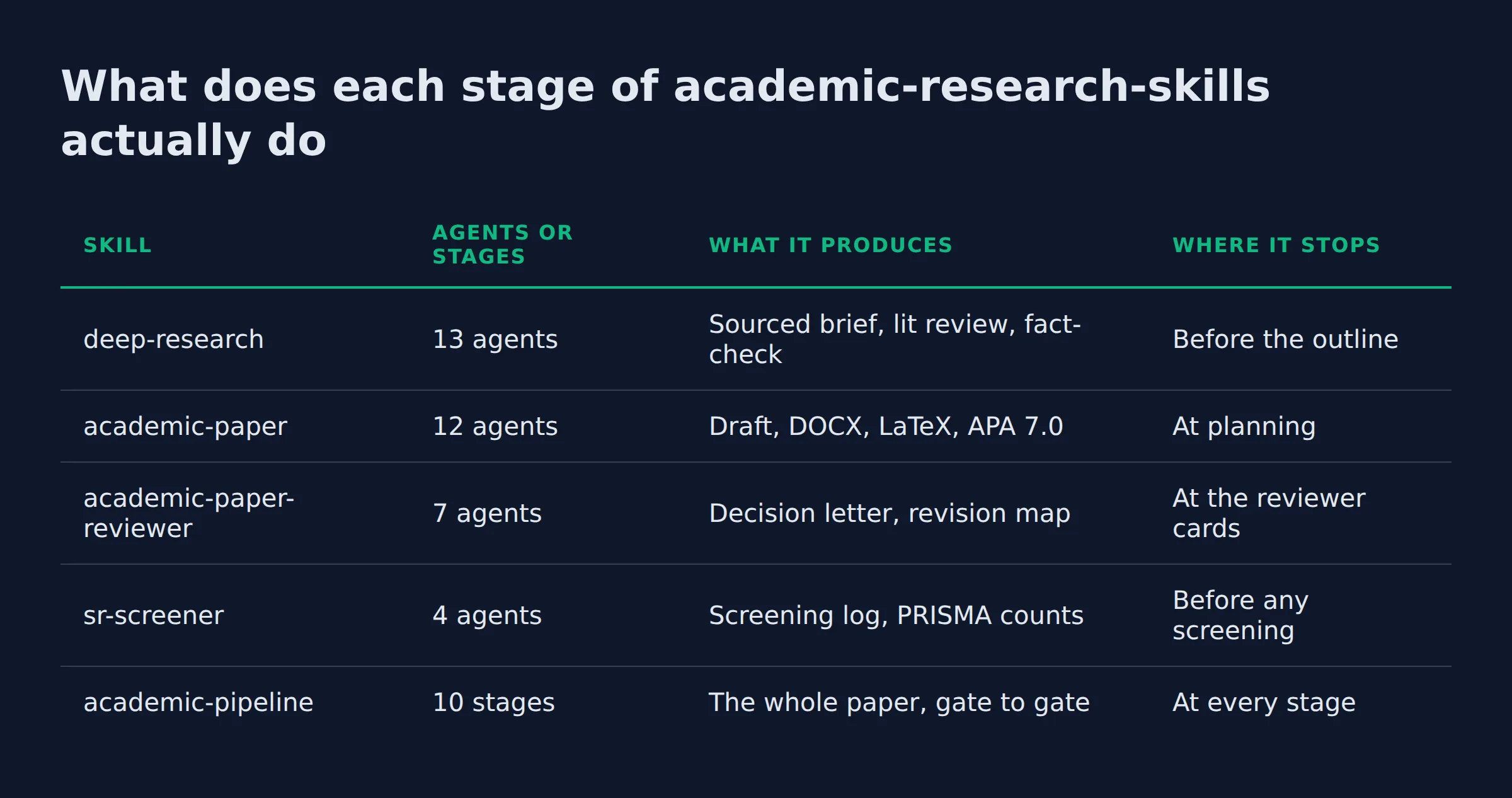
Each skill owns one stage. Deep research gathers and verifies sources. The paper skill writes and formats, the reviewer runs a 7-seat panel, and the screener produces PRISMA counts. The pipeline chains all 5 with a mandatory integrity gate twice.
| Skill | Agents or stages | What it produces | Where it stops |
|---|---|---|---|
deep-research |
13 agents | Sourced brief, lit review, fact-check | Before the outline |
academic-paper |
12 agents | Draft, DOCX, LaTeX, APA 7.0 | At planning |
academic-paper-reviewer |
7 agents | Decision letter, revision map | At the reviewer cards |
sr-screener |
4 agents | Screening log, PRISMA counts | Before any screening |
academic-pipeline |
10 stages | The whole paper, gate to gate | At every stage |
Deep research is the entry point. It ships 8 modes, from a quick brief to a systematic review.
The paper skill carries 11 modes, including a citation check you can run on a finished draft. Its LaTeX source compiles through tectonic for PDF.
The reviewer seats a Journal-Fit Reviewer, 3 dynamic reviewers, and a Devil’s Advocate with a concession threshold. That last seat argues against the paper instead of editing it.
Systematic review work runs to PRISMA 2020, the reporting guideline for reviews that evaluate intervention effects, per the PRISMA statement. sr-screener prints its counts in that shape. Two blinded screeners read every record, and a third breaks ties.
The pipeline is the only piece that runs all 5 skills in order, and its integrity gate is a step you cannot skip.
How do these skills stop fabricated citations?
Each reference is checked against 4 bibliographic indexes, and a failed check can block the formatter. The gate exists because fabricated references now scale: an audit of 111 million references estimates 146,932 hallucinated citations in 2025.
That audit covered 2.5 million papers and found a sharp rise in non-existent references after LLM adoption. Its authors note that preprint moderation and journal review catch only a fraction, in arXiv:2605.07723.
The suite answers in layers. Version 3.11 added a deterministic four-index citation gate. Version 3.7.3 gave every citation a locator anchor, so a check can point at a page instead of a title.
Version 3.8 added an opt-in audit. Set ARS_CLAIM_AUDIT=1 and it fetches the cited source against the anchor, then judges whether that source supports the claim. Five warning classes, including fabricated-reference and claim-not-supported, can refuse output at the formatter gate.
The honesty detail is in the repo. The calibration runner accepts a false-negative rate under 0.15 and a false-positive rate under 0.10, measured on a 25-tuple gold set. That shipped test drives the runner with a stub judge, so it checks the tooling. No live-judge result is recorded.
I run the same idea at a much smaller scale. The pipeline that drafted this page sends any numeric claim to a reviewer that rejects it without a source, and a linter blocks a sentence over 30 words. That gate is why a figure like 146,932 appears here with its paper attached.
The useful citation gate is the one that can refuse to format the paper.
Four gates I use before installing a research skill
Four questions decide whether a research skill earns a slot on my machine. Each one can be answered from the repo page without installing anything.
- Does it stop before it writes? A skill that drafts 15,000 words with no checkpoint hands you a cleanup job. Look for a named gate and a place where your answer gets recorded.
- Does it name the index it checks against? “Verified citations” means little. Four named bibliographic indexes is a claim you can test.
- Does it publish what it has not measured? Every tool has an unmeasured part. Only some say so in writing.
- Does the licence fit your use? A lock to academic use changes the answer for anyone who bills for writing.
| Gate | Weak answer | What this repo answers |
|---|---|---|
| Stops before writing | No checkpoints | 10 stages, confirmation at each |
| Names the index | “AI verified” | 4 bibliographic indexes |
| Admits gaps | Nothing published | NOT_CALIBRATED, stub-judge test |
| Licence fits use | Unstated | CC BY-NC 4.0, no commercial use |
This is the same read I give any file before it touches live work. My outreach system takes about 200 form submissions a day, and every agent in that chain has a stop rule I can read in one screen. A suite that writes a paper deserves a stricter read.
Four questions answered from the repo page beat a week of trying a tool out.
Are academic research skills for Claude Code free?
The download is free. Model time is the real bill. The repo’s own cost note budgets about US$3 to US$7 for a 15,000-word paper at 2026-09 list prices. Cache discounts come off that figure.
The software costs nothing to install, and the non-commercial licence covers personal and academic use.
Everything else runs on your Claude Code account, so the spend is tokens. The repo’s docs/PERFORMANCE.md adds per-mode token budgets and the full-pipeline estimate. A third-party guide puts a 15,000-word paper at $4 to $6. That range is close enough that neither figure changes the decision.
Cross-model verification adds spend when you turn it on. ARS_CROSS_MODEL routes a second opinion to another model, and the repo’s data-flow doc lists what leaves your machine when it does.
For the subscription side, the Claude Code pricing breakdown covers what a plan includes.
Budget a few dollars of model time per paper, and expect that number to move with your plan and your caching.
How do they differ from subagents, slash commands, and a pasted prompt?
A skill is a file that loads when the job matches. A subagent is a separate assistant with its own context and tool access. Custom slash commands have merged into skills. A pasted prompt disappears when the session ends.
| Shape | Where it lives | Loads when | Good for |
|---|---|---|---|
| Skill | ~/.claude/skills/<skill-name>/SKILL.md |
A task matches it | Repeatable procedure |
| Subagent | .claude/agents/ |
You delegate to it | Isolated work in a clean context |
| Slash command | .claude/commands/deploy.md or a skill folder |
You type /deploy |
One specific action |
| Pasted prompt | Your chat | Once | A one-off |
Anthropic’s docs state the merge plainly: .claude/commands/deploy.md and .claude/skills/deploy/SKILL.md both create /deploy, per the skills docs.
Subagents solve a different problem. Each one runs in its own context window with its own system prompt and permissions, per the subagent docs. A long research run floods one thread, so the suite pushes parts of it to subagents.
Hooks fire on events instead of on request. The plugin ships a session-start announce, which is where its update notice comes from.
A skill holds the procedure. A subagent holds the isolated work. A pasted prompt holds nothing after the session.
What the repo admits it has not measured
The repo marks its own review output as not calibrated. Live reviews stay NOT_CALIBRATED, and no score maps to an editorial decision. Its demo paper also comes from an older version.
The label sits in the skill description, not in a footnote. It also says a calibration profile is not wired into a live review.
That demo run used v2.3 in March 2026, before the Semantic Scholar check and the four-index gate existed. Its numbers describe a version you cannot install today.
Advisory checks added in v3.24.0 arrive with their own limit. The repo says their accuracy on real reviews is unmeasured. It reports a pre-release audit of 805 panel claims, with a false-claim rate between 1.5% and 12.9%.
I have not run this suite on a paper of my own. Every number on this page comes from the repo, its docs, or the paper the repo cites. The pipeline behaviour described here is documented behaviour. That is the honest version of a tool review from someone who has not used the tool.
Read the calibration labels before you read the feature list.
Where do the skill files live on disk, and can I share them with my lab?
Personal skills live in ~/.claude/skills/<skill-name>/SKILL.md and load in every project. Project skills live in .claude/skills/ and load in that project only. Copying the folder is the install, and the same copy is how you hand it to a labmate.
Claude Code resolves conflicts in a fixed order. Enterprise beats personal, and personal beats project, so a personal /deploy wins over a project version. The skills docs list that order and the paths.
Each skill’s frontmatter can pre-approve tools with allowed-tools. The docs warn that a skill can grant itself broad tool access, and that the grant clears on your next message. Read that field before you run a skill you did not write.
The suite is stricter than the standard. Its reviewer skills run read-only, each skill declares a data_access_level, and one repo document lists every data path that leaves your machine.
For a lab, a git repo or the plugin marketplace works better than copying folders. Attribution and the non-commercial limit travel with the licence.
Personal skills for a lab, project skills for one paper, and allowed-tools checked before the first run.
When is this suite the wrong choice?
Skip it for commercial deliverables, for work that is not a paper, or when you need a measured benchmark before you trust a tool. The suite fits academic writing where a human keeps the final call.
- Paid client work. The non-commercial licence blocks it. Use the suite for your own research, and read the terms again before you resell anything built with it.
- Deliverables that are not papers. Contracts, briefs, and marketing copy have no stage in this pipeline.
- A calibrated score. Live reviews are
NOT_CALIBRATED. Treat the decision letter as a second opinion from a sharp reader. - A single command. For one pass over a draft, install the plugin and run the paper skill alone. The 10-stage orchestrator is the expensive path.
- An unusual citation style. APA 7.0 is the default, and Chicago, MLA, IEEE and Vancouver are also listed. Check that list before you plan around it.
The suite is also heavy. Ten stages with a confirmation at each one is the right shape for a thesis and the wrong shape for a 2-page memo.
Where it earns its place is a long document with citations you will be asked to defend. That is the job it was built for, and the repo is honest about the parts it has not proved yet.
The suite fits one job: a long paper with citations you will be asked to defend.
FAQ
Can I use academic research skills for Claude Code on claude.ai or Claude Desktop instead of the terminal?
Yes, on a paid plan. Add the repo through Customize, then Plugins, then add a marketplace, and install the plugin. Hooks and plugin agents do not run in plain chat, so the automated gates only fire in the terminal.
Will my university treat a paper written with these skills as AI misconduct?
That depends on your institution’s policy, not on the tool. The suite ships a disclosure mode for publisher policies, and its positioning says it does not help you hide AI use. Ask your supervisor before you draft.
Does the suite export DOCX or PDF, or only Markdown?
Markdown always. DOCX needs Pandoc, and an APA 7.0 PDF needs tectonic plus the Source Han Serif TC font. LaTeX source is also written for APA 7.0, IEEE and Chicago.
How many skills and modes are in the suite, and do I need all of them?
Five skills, and each carries its own modes. Start with the paper skill for a single draft, add the reviewer when you want a panel opinion, and bring in the pipeline only for a full thesis.
What happens when the citation check flags a reference?
The gate can refuse to format the paper until you fix that entry. With the opt-in claim audit on, a source that does not support its claim lands in one of 5 warning classes and blocks the output.
The AutomateReal services page: where a workflow review turns one agent into one scoped build.
If you want help working out where an agent actually saves you a day, a discovery call maps it in about thirty minutes.