Agent SDK: What It Is and When to Build vs Buy
Agent SDKs explained: what Claude, OpenAI and Microsoft ship, what they cost to run, and when a small business should build instead of buy.
Type “agent sdk” into a search box and you land in three vendor manuals. Each one explains its own library well. None of them prints a monthly bill, and none says what breaks after you ship.
An agent SDK is the code that runs the loop between your model and your tools. It calls the model, runs the tool it asks for, and repeats until the task is done. You still write the app. Anthropic, OpenAI and Microsoft each ship one.
I run agents in my own business, and one of them handles live documents every morning. That is the seat this page comes from. The sections below cover the loop, the two decisions the vendor docs leave out, and the bill in real dollars.
Most pages on this term are written from inside a vendor’s own docs. They stop where the useful questions start.
TL;DR
- An agent SDK is the loop, the tools and the session state. The model is the part you rent by the token.
- Claude, OpenAI and Microsoft each publish one, in different languages and with different lock-in.
- Running an SDK agent costs tokens and hours. There is no seat price, because nothing here is sold by the seat.
- Build on an SDK when the workflow is yours and one person owns the code. Buy a managed agent when nobody owns it.
What is an agent SDK, and what does it do that a plain API call cannot?
An agent SDK is the library that runs the loop for you. You define the tools and the rules. It calls the model, runs the tool it asked for, then calls again until the task is done. You write the app instead of the plumbing.
A plain API call gives you one answer. If that answer is a tool request, the model stops and waits for your code. Anthropic’s own definition of an agent is software that completes a task by planning its own steps and calling tools that read files, run commands, or edit code. The loop that runs those steps is the work the SDK takes off your desk.
What you get is the shell around the model. The Claude docs put it plainly. The Agent SDK ships the same tools, agent loop and context management that power Claude Code. The library is programmable in Python and TypeScript, with built-in permissions, sessions and hooks.
Write that loop by hand and you own the sequencing. You send a call, receive a tool request, run the tool, append the result, and call again. That is the agentic loop, and every retry and timeout inside it becomes yours.
Sessions are the other half. A fresh call starts with no memory of the last one, and session persistence only happens when you capture the session id and pass it back. Fork a session and you get a branch to test without losing the original.
Tools reach outside the app through Model Context Protocol, the open standard that connects an agent to files, databases and other software. Where that stack sits next to skills, servers and subagents is covered in Claude skills vs MCP vs agents.
 AutomateReal skills
The SDK is the loop, the tools and the session state. The model underneath is the part you rent.
Which agent SDK should you use: Claude, OpenAI, or Microsoft?
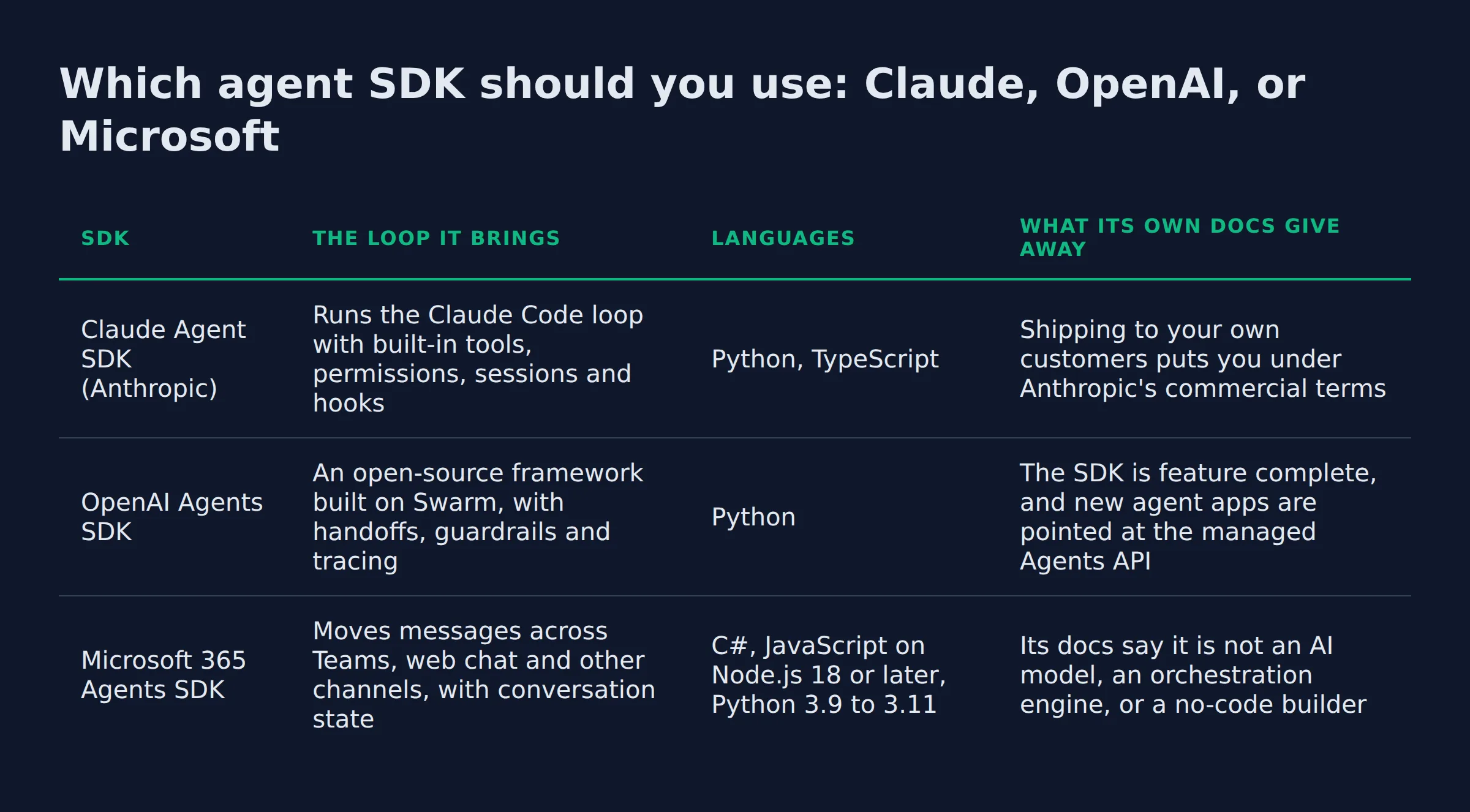
Pick by where the agent runs and who owns the code. Claude’s SDK drives the Claude Code loop from Python or TypeScript. OpenAI’s is a Python framework for multi-agent work. Microsoft’s moves messages between channels and stays neutral on the model.
| SDK | The loop it brings | Languages | What its own docs give away |
|---|---|---|---|
| Claude Agent SDK (Anthropic) | Runs the Claude Code loop with built-in tools, permissions, sessions and hooks | Python, TypeScript |
Shipping to your own customers puts you under Anthropic’s commercial terms |
| OpenAI Agents SDK | An open-source framework built on Swarm, with handoffs, guardrails and tracing |
Python |
The SDK is feature complete, and new agent apps are pointed at the managed Agents API |
| Microsoft 365 Agents SDK | Moves messages across Teams, web chat and other channels, with conversation state | C#, JavaScript on Node.js 18 or later, Python 3.9 to 3.11 |
Its docs say it is not an AI model, an orchestration engine, or a no-code builder |
Anthropic’s licence line matters once you sell anything. Use of the Claude Agent SDK falls under the vendor’s commercial terms, including when you power products your own customers reach. That makes the commercial terms you inherit worth reading before a customer touches the agent.
OpenAI’s docs describe the building blocks as agents, handoffs and guardrails, and the project frames itself as lightweight multi-agent orchestration built on top of Swarm. Its own docs carry the sharper warning, which is that the library is feature complete and new work is pointed at a managed route.
Microsoft takes a different angle. Its own supported languages list covers C#, JavaScript and Python. The docs then add that the SDK is not an AI model, an orchestration engine or a no-code builder.
That last line is a warning about scope. Microsoft’s docs are blunt about provider lock-in. A framework that bakes in one AI provider forces developers to rewrite large parts of their code when that choice changes.
Pick the vendor whose runtime you can live with, because the SDK decides where your code has to run.
The 4 questions I run before I pick a library
Four questions decide the pick, and the first one is whether you need a library at all.
- Does the loop already exist in your stack? If you build on
LangChain,LlamaIndexorCrewAI, that layer already runs the loop and handles the tools. Adding an SDK underneath it means two systems scheduling the same calls, which an existing orchestration framework already does for you. - Where does the process run? The Claude SDK drives the Claude Code binary rather than a pure API client. Engineers using it flag the deployment step and the tie to Claude models. On a small build that is fine.
- Which primitives will we use? In my pipeline the answer is subagents with their own context, one permission mode per role, and a hook that stops bad output. Subagent orchestration earns its keep, because each subagent gets its own context window and returns only a summary. OpenAI’s docs carry the same control under human in the loop approvals, which pause a tool for a person.
- Who owns the upgrade? Every SDK here moves. A second session interface arrived inside one minor release, custom tools run as in-process MCP servers, and custom tools and hooks are still the newest part of the stack.
I dropped one idea early. Giving every role its own agent looked tidy on a diagram, and it doubled the number of prompts I had to keep in sync. A short role list with one reviewer at the end is easier to keep honest.
The library is a maintenance commitment. The demo takes an afternoon, and the upkeep takes the year.
What does it cost to run an SDK-built agent each month?
Three lines make the bill: model calls, the cap you set per run, and the hours to keep it running. No seat price exists, because an SDK agent rents tokens instead of buying a plan.
Start with the rates. These were read from both vendors on the day this was written.
| Model | Input per 1M tokens | Output per 1M tokens | What it fits |
|---|---|---|---|
| Claude Sonnet 5 | $2.00 | $10.00 | The default for agent work |
| Claude Haiku 4.5 | $1.00 | $5.00 | High-volume steps that read and file |
gpt-6-sol |
$2.00 | $10.00 | The OpenAI equivalent tier |
gpt-6-luna |
$0.10 | $0.50 | Bulk classification |
Claude Opus 5.5 |
$4.00 | $20.00 | Hard reasoning you run rarely |
Those figures come from Claude’s published token rates and the OpenAI pricing page. Now put one workflow against them. Say it makes 20 model calls, sends 40,000 input tokens and gets 4,000 back per run. On Sonnet 5 rates that is $0.12 a run. Run it 200 times a month and the model bill is $24.
Haiku 4.5 cuts the same run to $0.06, or $12 a month. gpt-6-luna takes it to $0.006 a run. The gap between the top tier and the bottom one is 20 times, and few workflows need the top tier for every step.
Then the extras. Web search runs $10 per 1,000 searches on both platforms, so one search per run adds $2 a month at 200 runs. Anthropic meters its managed runtime at $0.08 per session-hour of active runtime, and code execution at $0.05 per hour per container, on the same pricing page.
The line that surprises owners is the cap. A long session can keep calling tools, and the invoice only shows up at the end of the month. The Claude SDK takes a maximum budget per run. The engineers who use it say to set a budget cap on each run before the first real job, rather than after the first shock.
Seats and credit packs are the other shape of an agent bill, and how to build an AI agent owns those published prices.
Token rates are the small line. The cap and the maintenance hours are the two lines nobody quotes you in advance.
Convert the bill into hours before you sign off
Every figure above converts into hours, and the hours are the number that decides the build.
My own outreach system takes in about 200 form submissions a day. Answering that queue by hand is the job I did not hire for. The agent that drafts the first reply gets judged on hours returned, rather than on how cheap its tokens look.
Take the monthly token bill and ask how many hours of a person’s week it replaces. A $24 bill against a task that eats 2 hours a week is easy to defend. The same $24 against a task that runs twice a month is a hobby with an invoice.
This is where an SDK build fails on the economics instead of the code. The meter is cheap. The hours are not.
Judge the build on hours replaced, not on how small the token line looks.
Do you build on an SDK or buy a managed agent?
Build when the workflow is yours and one person owns the code. Buy when the job runs at volume in front of customers, or when nobody on the team will maintain the loop.
| Path | Who runs the loop | What you own | Where it fits |
|---|---|---|---|
| Write it on an SDK | Your code, on your infrastructure | The loop, the prompts and every failure | One workflow you understand and control |
| Managed agent | The vendor, on their runtime | The configuration and the review queue | Customer-facing work at volume |
| Hand the build to someone | Their code until handover, then yours | The outcome and the runbooks | A workflow you want run without hiring |
Federal guidance for small firms is short and worth reading, and the SBA’s AI guidance for small business says AI can improve efficiency and help owners save time. It also points owners at their own data first.
Sierra names the choice on its own product page, where the vendor’s own build versus buy framing lists simulations, debugging and contact-center handoff as build-side work.
Anthropic sells the same split. Its managed agents run the loop for you, with sessions in a managed sandbox or one on your own infrastructure.
OpenAI has already made the move. Its library is feature complete, and new agent applications are pointed at the managed route.
The honest reason to buy is who answers when it breaks. A managed agent puts that on a support contract. An SDK build puts it on a person, and that person is usually the one who wrote it. If you would rather the mapping and the handover sat with someone else, the AI services page shows how that work runs.
 AutomateReal services
Build on an SDK when the workflow is yours and a name is on the code. Buy when that name does not exist.
What breaks in month one, and who fixes it?
Two failures take most of month one: input arriving in a shape the rules never covered, and a vendor shipping a change underneath you. A named owner fixes both, usually inside an afternoon.
The first agent I put in front of live work read long bid documents, pulled the fields out, and routed one record per job to a team chat. In week one it posted the same row twice and linked a directory page where the apply-able post belonged. A person caught both, because nothing left the box without a review.
The fix was a gate rather than a better prompt. One record per job, a duplicate check before a row leaves, and a link that has to resolve to the apply-able page.
Then the version problem. An agent that runs every morning reads whatever the vendor shipped last week. One minor release already introduced a second session interface, and the engineers writing about it say that interface is still moving.
Risk is where government guidance helps a small operator. NIST on agentic AI is its own topic area at the agency, with an AI Agent Standards Initiative and its risk work behind it.
The NIST AI Risk Management Framework is voluntary, and it covers how a system is designed, developed, used and evaluated. Human oversight sits inside that work, and OpenAI builds the same control in as a native approval step.
Setup time follows access rather than code. A first agent does something useful within days. A supervised one takes a few weeks, and most of that is waiting on API keys and permissions for the software it has to touch.
Maintenance on an SDK build is a short list you can actually do. Pin the version, read the changelog before you upgrade, then re-run the test job after every bump. That list needs a name on it, and if the name is nobody inside your team, the AI services page covers who carries a loop after launch.
Week one is a data-shape problem and a version problem. Put a person in front of anything customer-facing and keep one name on the code.
Related: AI Agents for Small Business: What They Do & How to Start
Related: Agentic AI Explained for Small Business Owners
Related: AI Agents Examples: Real Use Cases for Small Business
FAQ
Is an agent SDK free to use?
The library costs nothing. Anthropic and OpenAI both publish their SDKs on GitHub, and Microsoft’s ships with its platform documentation. What you pay for is the model calls, the runtime and the hours. Free software with a paid meter is still a paid system.
Do you need to know how to code to use an agent SDK?
Yes, in the plain sense. An SDK is a library you call from code, and someone has to write and maintain that code. An owner who wants no codebase has a real path, and it runs through a no-code builder or a build handed to someone else.
Which AI agent is best for a small business?
There is no best agent in the abstract. The right one drops into a workflow you already run, next to the tools you already pay for. Judge it on the first job it finishes without you, then on how fast a person can check that job.
How are small businesses using AI agents?
Mostly on marketing and admin work. The SBA tells owners to start with their own business data, and the work is unglamorous much of the time. A queue gets cleared and a follow-up goes out on time.
How long before an SDK-built agent does something useful, and will it work with the tools I already use?
Days for a first useful run, and a few weeks for one you supervise. It works with any tool that has an API or an MCP server, which covers most inboxes, calendars and job records. A tool with no connection stays a manual step until someone writes the connector.
If you want help working out whether your workflow deserves its own code, a discovery call maps it in about thirty minutes.