AI vs Automation: What's the Difference? (2026)
AI decides. Automation follows rules. The difference in plain terms, where each one wins, what they cost, and which one to start with in a small business.
An invoice lands at 6:40 on a Friday. One system pays it. Another reads the note that says the client is disputing the charge. Those are two different machines, even when one tool runs both.
Search this term and you land on vendor glossaries written for office teams of 500. Nothing about the monthly bill in a shop with 6 people. I run both halves in my own business every day, so this is the version I wanted to find.
How is AI different from automation, and which one should you use? Automation runs a fixed sequence: when X happens, do Y, every time. AI reads messy input and decides what happens next, so the same input can return a different answer. Most small businesses run both.
TL;DR
- Automation follows a rule a person wrote. AI reads the input and picks the next step.
- Most small shops run both, with the split drawn per task.
- Entry prices per month: $19.99 for a rule-based tool, $25 for RPA, and $30 for an assistant seat.
- The step that moves money stays a rule. The step that reads human language goes to a model.
How is AI different from automation?
Automation repeats a fixed step: a trigger fires, and the same action follows every time. AI reads the input, decides what to do with it, and writes its own next step. One returns the same answer twice. The other can return two different answers to the same question.
The automation vs ai question comes down to one thing I check first: who writes the next step. A person writes every branch in advance for traditional automation. A model picks the branch instead. Red Hat’s definition of the split puts it as automation executing tasks on predefined rules while AI adapts to make non-rule-based decisions.
The difference between AI and automation shows up in the output. Same input and same result is deterministic output. A model works from statistical probability, so one message can come back worded differently an hour later. That second kind is probabilistic output, and it is the reason a model needs review.
IBM’s definition of artificial intelligence covers technology that performs tasks which normally need human intelligence. The line moves every year. What counted as AI in 2015 is a decision rule today. Chatbots, decision rules, and workflow automation all started on the AI side of it.
Who writes the next step decides the whole design. Automation is a rule you can read, and AI is a decision you have to check.
The five checks that decide it
Five checks decide whether a step gets a rule or a model. Run them in order, since a failure on the first one takes the work off the automation list.
- Deterministic output: does the step have to return the identical answer every run?
- Input shape: is the input structured (a form field, a payment record) or messy (a voicemail, a forwarded email)?
- Failure cost: what does a wrong answer cost when nobody is watching?
- Setup and upkeep: who builds it, who fixes it, and how many hours a month does that take?
- Exit: how hard is it to move off the tool or the vendor in a year?
That ai vs automation comparison runs on any step in any job. Three of the five answers usually point at automation for admin work:
- The input arrives in a form field.
- The answer has to match to the cent.
- A mistake means a wrong invoice.
Zapier’s comparison splits the field the same way, into automation, AI, and agentic AI. The third one plans its own sequence of steps, which is where cost and risk both rise.
The upkeep check is the one owners skip. A rule-based build has a quiet cost, because every time a connected app changes a field or an API, someone has to repair the path. That someone needs a name before launch.
Score the step on all five before you pick a tool. The failure-cost check on its own rules out a model on anything that moves money.
Where does plain automation still win?
Plain automation wins wherever the answer has to be identical every time. Invoice matching, appointment reminders, and moving a form entry into the CRM all run on fixed rules. The cost of a wrong answer is high enough that a model has no place in the step.
Business process automation is the name for this half. The work repeats on a schedule or a trigger, and the output has a shape you can check by eye. A quote that goes out at 9am every day is a short build.
The wins are dull and they hold. A deadline fires with no reminder, and the data lands in one place without a person pressing send. The reply timer in my own lead pipeline works that way. It fires on every form without me touching it, and I never think about it.
RPA sits at the heavy end of the same idea. A robotic process automation bot clicks inside apps that cannot talk to each other. UiPath sells that pattern to teams with screens nobody can change. The bot stops the moment a button moves.
Microsoft Power Automate covers the same ground for teams already inside Microsoft 365. It runs on the same decision rules as any other workflow tool, with a low-code builder on top.
None of this removes the human in the loop. Someone still owns the exception when a case does not match a rule, and on my own builds that someone is me. Before a system gets access to real customer data, NIST’s AI Risk Management Framework sets out the governance questions worth answering.
Fixed output is the whole point of this half. Keep automation on the steps where a wrong answer costs more than the time it saves.
Where does AI win, and when is it overkill?
AI wins where the input has no fixed shape. A voicemail, a forwarded email, and a photo of a handwritten form all need reading before any rule can touch them. A model turns those into structured fields. It is overkill when a form field already answers the question.
Reading is the first job a model does well. OCR pulls text off a scan, and a large language model turns that text into a job type. Intake triage is the shop version of it. Every new message gets read, tagged, and routed before a person opens it. A chatbot answers inside one window and stops there.
Agentic AI takes the next step and plans a sequence toward a goal. An AI agent is that pattern pointed at your own tools. MCP (Model Context Protocol) is the connector that lets a model reach those tools through one standard. The MCP docs compare it to a USB-C port for AI applications.
Lists of the best AI agents for business automation rank brands. The jobs that pay back first in a shop this size are narrower:
- Lead follow-up after a form or a call.
- Quote follow-up when the customer goes quiet.
- Intake triage on a shared inbox.
- Scheduling and reschedules.
Each of those reads input a rule cannot describe, which is why they sit on this side of the split.
The overkill signal is easy to spot. A model on a step where the input already fits a field adds cost and a chance of drift. Matching an invoice to a purchase order needs the cents to agree.
Put a model where the input arrives in human shapes, like a voicemail or a PDF. A step whose input already sits in a form field belongs on the rules side.
What do the two cost, side by side?
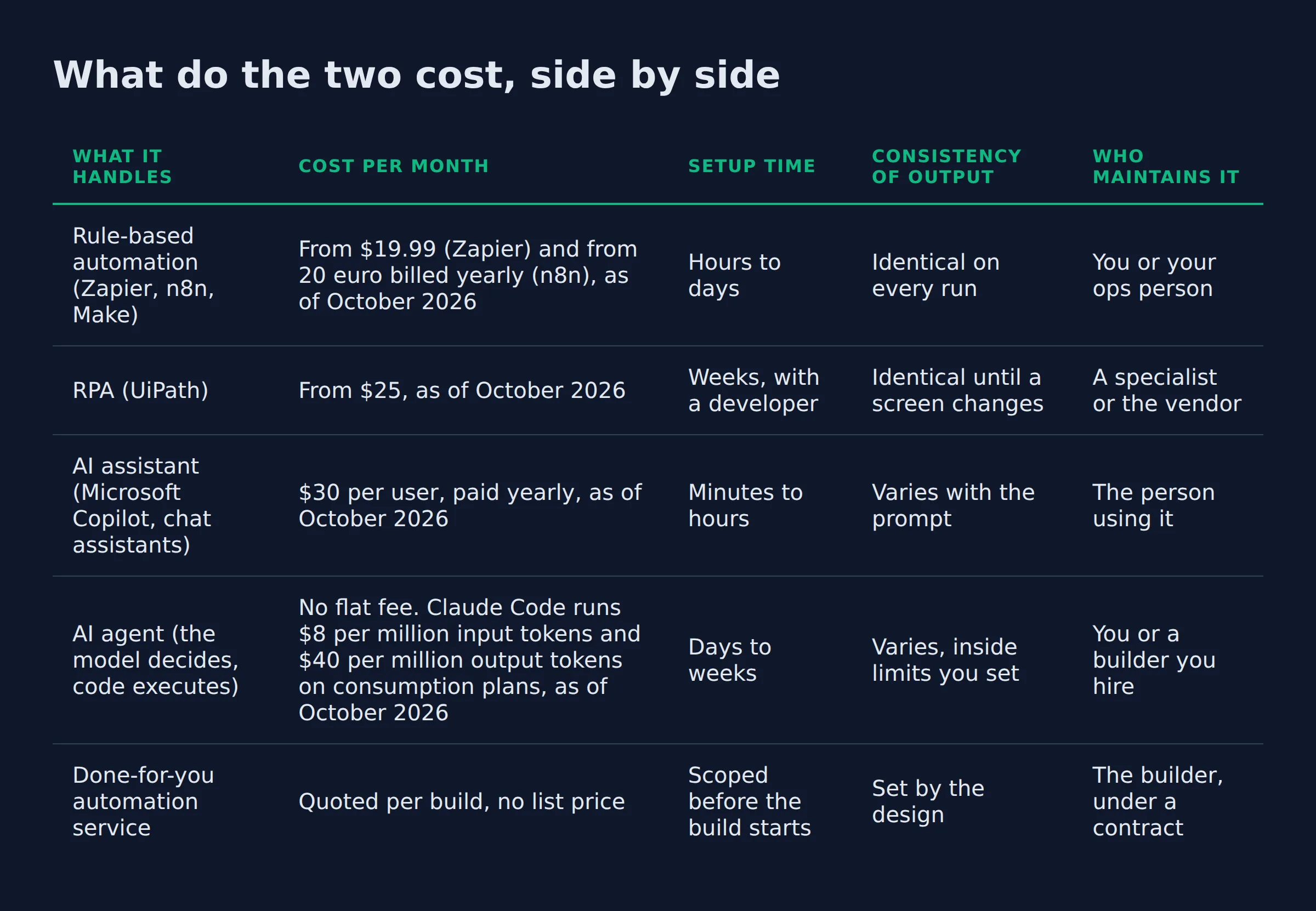
Rule-based tools start near $20 a month. An RPA platform starts near $25, and an assistant seat runs $30 per user. RPA and agents both bill extra for runs, tokens, or seats. A done-for-you build has no list price, because the scope sets it.
Here is the head-to-head. Every price came off the vendor’s own pricing page, and the month I checked it sits in the cell.
| What it handles | Cost per month | Setup time | Consistency of output | Who maintains it |
|---|---|---|---|---|
| Rule-based automation (Zapier, n8n, Make) | From $19.99 (Zapier) and from 20 euro billed yearly (n8n), as of October 2026 | Hours to days | Identical on every run | You or your ops person |
| RPA (UiPath) | From $25, as of October 2026 | Weeks, with a developer | Identical until a screen changes | A specialist or the vendor |
| AI assistant (Microsoft Copilot, chat assistants) | $30 per user, paid yearly, as of October 2026 | Minutes to hours | Varies with the prompt | The person using it |
| AI agent (the model decides, code executes) | No flat fee. Claude Code runs $8 per million input tokens and $40 per million output tokens on consumption plans, as of October 2026 | Days to weeks | Varies, inside limits you set | You or a builder you hire |
| Done-for-you automation service | Quoted per build, no list price | Scoped before the build starts | Set by the design | The builder, under a contract |
Two rows on that table carry the risk. Setup time is the number owners underestimate, and upkeep is the number they forget. A $19.99 plan still costs an afternoon a month to keep the connections alive.
The honest answer to how much it costs for an AI agent is that the tool bill is the small part. Model calls grow with volume, and the token price above is the meter. The hours someone spends checking the output grow with volume too.
Budget the upkeep next to the subscription. A cheap plan with no owner costs more than a paid plan with one.
Which one should a small business start with?
Start with plain automation on any step that repeats weekly and ends in a number you track. Add a model only where the input arrives messy. In a business under 20 people, that means rules first, then one AI assistant on the job that leaks the most time.
Size decides the order. The Census Bureau’s Business Trends and Outlook Survey put business AI use between 17 and 20 percent across US firms from December 2025 to May 2026. The national rate was 19.8 percent.
Fewer than 20 percent of firms with four or fewer employees reported AI use. At firms with 250 or more employees, the rate reached 37 percent.
A second survey reads much higher. Stanford HAI AI Index found 78 percent of organizations reporting AI use in 2024, up from 55 percent a year earlier. The gap comes from who gets asked and what counts as use. Both sets of numbers point the same way on direction, and neither changes the order.
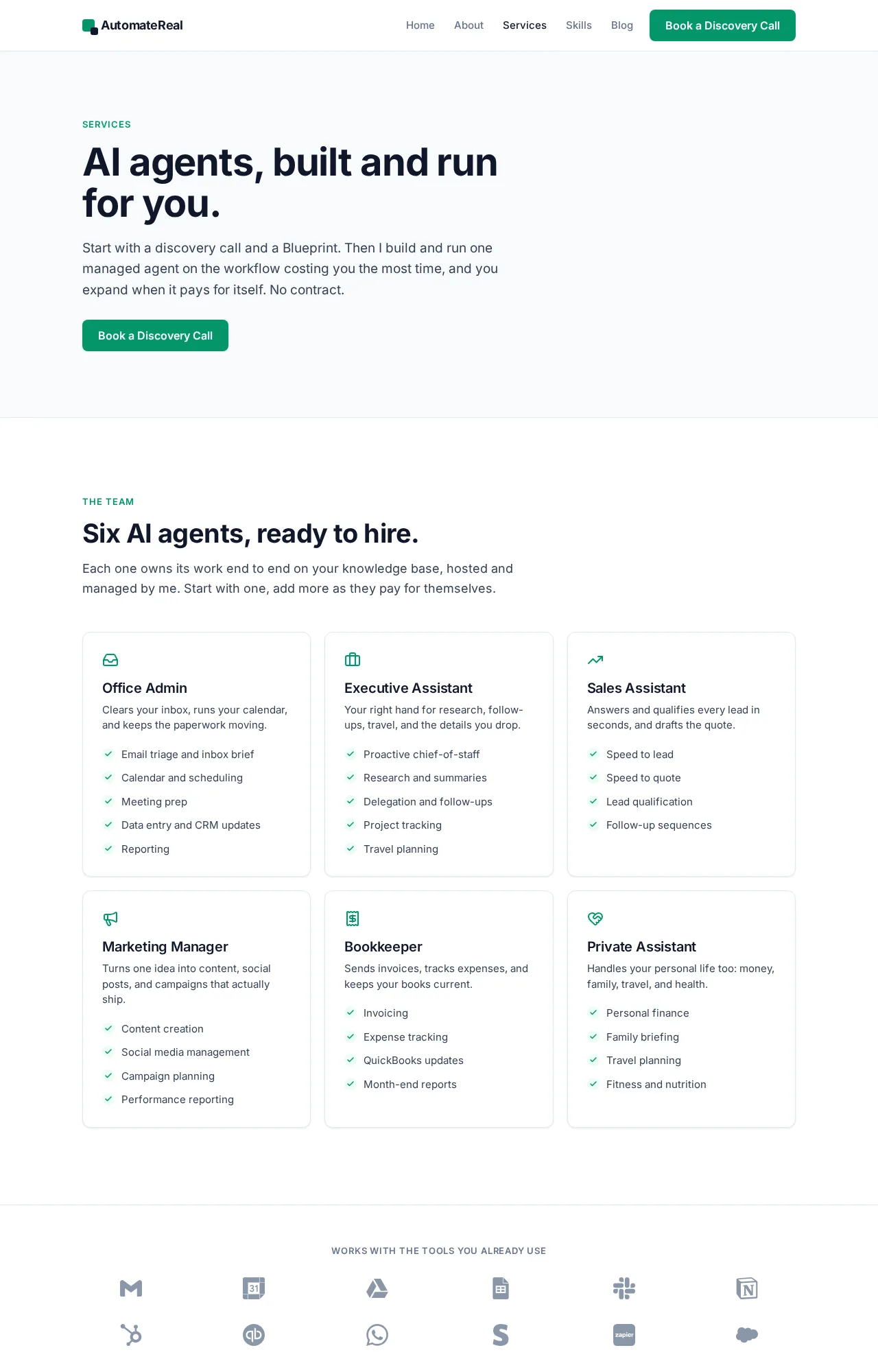
what automation actually means is the piece to read first if this is your opening project. When a model joins the workflow, AI automation in a small business covers what changes. If you would rather not wire it yourself, the AI services page sets out what a done-for-you build includes.
 AutomateReal services
One line per case:
- Solo owner with one repetitive task: plain automation, because one rule covers the whole job and nobody is free to watch a model.
- 3 or more crews with a shared inbox: an AI assistant on intake triage, since the same inbox carries quotes, reschedules, and questions.
- A business with a phone that rings at 9pm: an after-hours AI assistant for small business, booking the job and writing the summary into the CRM.
- A business that already pays for a platform it underuses: automation inside the platform you own, because the seats are already paid for.
Order beats budget. Run the rule first, then hand the messy input to a model once the rule has a number attached.
The split inside a small business
The split inside a real business runs down the middle of one workflow. Rules hold the parts that touch money, and a model holds the parts that touch human language. The seam between them is one structured record that both sides trust.
Here is the split I run on my own lead generation. My outreach system takes about 200 form submissions a day, and the follow-up runs without me touching it. The rule-based half handles the joins. It writes the record and tags the source, then fires the first reply on a timer. The model half reads what comes back and drafts the next message for me to check.
The build broke once on a lead who answered on 2 channels. One person sent an email and left a voicemail the same afternoon. The rule read 2 records that did not match, so it wrote 2 replies. A rule cannot see that two records are one person. That blind spot is why I put a model on the reading side and left the record step alone.
The monthly bill splits the same way. The rules half runs on a workflow tool that starts at 20 euro a month. The model half bills per call, so it grows with volume. At my volume the rule line stays flat and the reading line moves.
| Step in the workflow | Who handles it | Why |
|---|---|---|
| Write the record from the form | Rule | Every field has a fixed home |
| Fire the first reply | Rule | The text never changes |
| Read the reply that comes back | Model | The wording arrives in any shape |
| Sort the reply into a bucket | Model | The phrasing changes every time |
| Draft the next message | Model, with a person checking | Someone reads it before it sends |
| Take a payment or a refund | Person | A wrong number here costs real money |
The last row is the one I will not hand to a model. Payments, refunds, and reschedules stay with a person, because a wrong balance is not a bad sentence. This is the human in the loop step in plain form. The model drafts, and a person approves before anything leaves.
More AI agents examples shaped like this one sit in AI agent use cases, each mapped to a number worth watching.
Lock the money steps to rules and a person. Give the model the reading and the drafting, and keep one approval on anything a customer reads.
FAQ
Is AI a type of automation?
AI can run inside an automation, and the two are different machines. Automation is the machinery that fires a step. AI is the part that decides what the step should be. A workflow can use both, with a model choosing a branch inside a rule-based frame.
What is automation in simple words?
Automation is a machine doing a repeatable job without a person driving each step. You write the rule once, and it runs every time the trigger fires. A thermostat holding a temperature is automation. An invoice email that leaves on the first of the month is automation too.
What are the four types of AI?
The four types are reactive machines, limited memory, theory of mind, and self-aware AI. IBM’s breakdown of AI types sorts them by function. Only the first two run in products today, and the other two stay theoretical.
Is an AI virtual assistant just automation?
An AI virtual assistant is a different machine, because it reads what a caller says and decides the next step. Plain automation answers a menu press the same way every time. In most small shops the assistant sits on the phone and the inbox, where the incoming wording never repeats.
Which one breaks more often, and how do you catch it?
Automation breaks loudly, and AI breaks quietly. A rule that meets an unhandled input stops or routes to a person, so you spot it fast. A model that misreads a message writes a fluent, wrong answer. Catch it with a sample check and one approval on customer-facing output.
If you want help drawing that split on your own workflow, a free comparison maps it out. You get the steps that should stay rules and the steps worth handing to a model. Bring the job that eats your week, and I will tell you which half it belongs in. The AI services page shows what a build covers if you would rather not wire it yourself.
 AutomateReal skills