Generative AI for Small Business: What It Does and Costs
Generative AI creates text, images, video and code from a prompt. What it costs, where a small business uses it, and what has to stay with a person.
A five-person shop can get a usable first draft of almost anything in under a minute. The slow part is the minute after that.
Generative AI is software that creates new content, text, images, audio, video or code, from patterns it learned in training data. You type a prompt and it produces a draft in seconds. For a small business that means faster writing, images and customer replies, with a person checking every output before it goes out.
TL;DR
- Generative AI makes drafts from a prompt, and it decides nothing on its own.
- 58% of small businesses use generative AI, while under 20% of firms with 4 or fewer employees use AI in any business function.
- Cost runs from a free tier to per-token billing, and the tool bill is the small one.
- Anything a customer will read needs a person on the approval step.
The vendor explainers from IBM, AWS and Google Cloud cover the theory well. They stop at the front door of an owner’s Tuesday, and this page opens it.
What is generative AI, and how is it different from a chatbot?
Generative AI is the model that creates the content. A chatbot is the window you type into. ChatGPT, Microsoft Copilot and Perplexity are chat products built on generative models. One engine sits behind all of them, and it is the part that writes.
IBM files generative AI as the category and the chat window as one interface over it, per its explainer. The phrase “ai virtual assistant” draws 5,400 US searches a month in our own keyword pull. That term carries a difficulty of 26 and a $26.22 cost per click.
Which tools are we actually talking about?
The names you will meet are ChatGPT, Google Gemini, Anthropic Claude, Microsoft Copilot, Meta Llama and Perplexity. Image and video work runs on Midjourney, DALL-E, Stable Diffusion and Sora. Most owners start with one chat tool and one image tool.
A chatbot is one door into a generative model. The model is the part that writes.
How does generative AI work, in plain terms?
A foundation model learns patterns from training data, then predicts what comes next. A large language model predicts the next token in a sequence. A diffusion model rebuilds an image from noise in many small steps. You prompt, and it produces.
Nothing inside the model is a copy of a source document. IBM’s explainer splits the cycle into three phases, from training through generation, per IBM’s generative AI explainer. Google Cloud’s page pairs Gemini with retrieval-augmented generation, or RAG, per its generative AI page.
The words the vendors use, translated
Vendor pages throw the same handful of words at you. Foundation model is the pretrained base you adapt. Fine-tuning means teaching it your examples. Tokens are the chunks you get billed for. RAG means it checks your files before it answers.
- Foundation model: a large pretrained model you adapt to your job.
- Large language model (LLM): the text engine inside ChatGPT, Gemini, Claude, Copilot and Llama.
- Transformer: the architecture that made long text cheap to read.
- Diffusion model: how DALL-E, Midjourney, Stable Diffusion and Sora build images and video.
- Generative adversarial network (GAN): 2 networks trained against each other to make realistic output.
- Variational autoencoder (VAE): an older image architecture still used inside newer stacks.
- Multimodal: 1 model that reads text, images and audio together.
- Token: the small chunk of text a model reads and bills.
- Prompt engineering: writing an instruction so the first draft is usable.
- Training data: the text, images and audio the model learned its patterns from.
- Retrieval-augmented generation (RAG): the model checks your files before it answers.
- Hallucination: a confident answer with no basis in fact.
- Deepfake and synthetic media: audio, image or video a model generated rather than recorded.
- Human in the loop: the person who approves output before it ships.
- Automation layer: Zapier, n8n, Make and Lindy, where a model gets wired into your other apps.
What is fine-tuning, and when do you need it?
Fine-tuning is extra training on your own examples, so the output picks up your wording and your prices. You need it when every reply has to sound like your business. For most owners a strong prompt and your own files come first.
I keep tuning late in a build, because it costs money and upkeep. Vertex AI and Bedrock both sell the tuning step next to plain model access, per Vertex AI pricing and AWS Bedrock pricing.
Does the model know anything about my business?
Only what you put in front of it. A model that has never seen your price list will invent a version of it that reads as plausible. Your own files in the context window are what fix that.
The model predicts the next chunk of text. RAG is what stops it guessing about your business.
What can a small business actually do with generative AI?
Owners get the fastest return from work they repeat every week. Drafting customer replies and writing service descriptions top the list. Photo cleanup and long-document summaries come next. Each of those jobs ends in a draft a person can check.
The SBA pairs that speed with a condition. Customer trust is the price of the shortcut, per its guidance on AI for small business.
Advertisers bid $57.71 a click on “ai assistant for small business” in our own keyword pull. The longer “best ai assistant for small business” sits at 70 searches and a $21.52 click. Someone thinks this buyer is worth money.
The 4 jobs worth handing over first
Start with replies, service descriptions, photo cleanup and summaries. Each one has a check you can run in under 5 minutes. A bad draft is free. A wrong quote that reaches a customer is not.
- Customer replies: check the price, the date and the promise.
- Service descriptions: check the service area and the offer.
- Photo cleanup: check the before and after side by side.
- Document summaries: check each field against its page.
Where does the local side fit?
Google Business Profile posts and review replies are the easiest wins for a local shop. The model drafts from a photo and a service. A person still confirms the address, the service area and the offer. No model creates a review or moves you into the local pack.
I write Google Business Profile posts and review replies for home-service businesses, and the draft takes a minute. Checking that the post names the right town takes longer, because a post that ranks in the wrong service area is worse than no post.
Pick the job you repeat weekly. A task you touch twice a year has no return and no practice.
What are real examples of generative AI at work?
Real examples look small. A reply drafted from a policy file. A photo cleaned up and resized. A 40-page bid document cut to 12 fields. A weekly report written from a spreadsheet. The draft covers most of the work, and a person closes the gap.
Adoption is not the open question. The US Chamber of Commerce puts 58% of small businesses on generative AI, up from 40% in 2024. Stanford’s AI Index 2026 counts organizational use at 88%, with $172 billion a year in value to US consumers by early 2026.
Small firms are the slower half. Census data on AI use by firm size shows 37% adoption at firms with 250 or more employees, against a national rate of 19.8%.
Under 20% of firms with 4 or fewer employees use AI in any business function, and the SBA’s Office of Advocacy tracks that gap closing.
My own outreach takes about 200 form submissions a day, and the sorting and follow-up run on automation. One agent in my pipeline reads a long bid document and files one clean record per job. AI agents for small business covers that longer build.
The output everyone sees is a draft. The part that makes it safe is the check behind it.
What does generative AI cost, and is there a free option?
Free access is real. Google AI Studio runs Gemini models on a free tier, and ChatGPT, Copilot, Claude and Perplexity each have a free plan. Paid access starts with volume, your own data or an API. Run a job free for a few weeks before you spend anything.
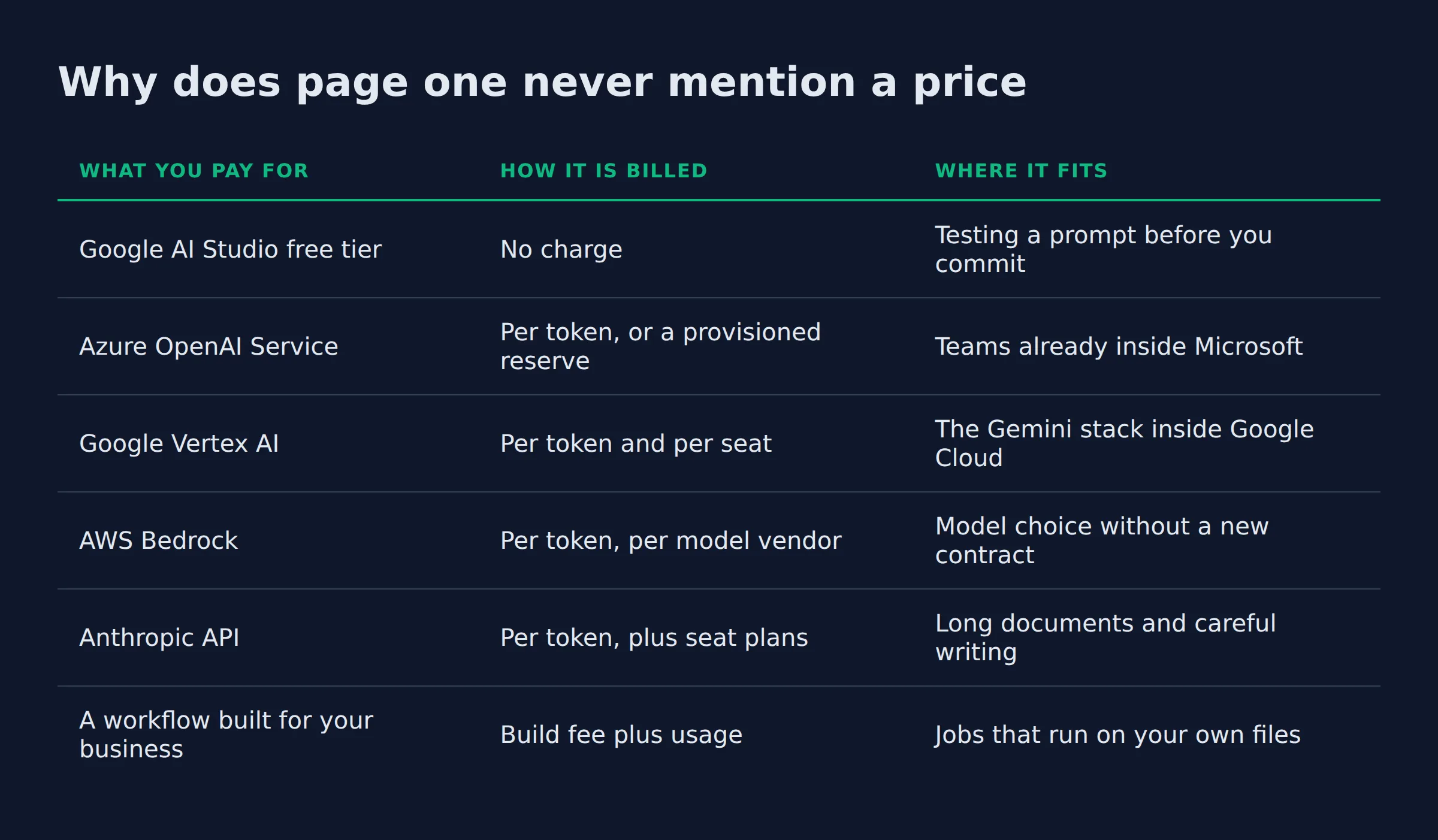
Why does page one never mention a price?
Page one for this term is a wall of vendor explainers. IBM, AWS and Salesforce wrote the vendor versions. Google Cloud and Wikipedia fill the middle, with McKinsey, generativeai.net and the University of Pittsburgh’s teaching center behind them. Not one of them names a monthly price.
| What you pay for | How it is billed | Where it fits |
|---|---|---|
| Google AI Studio free tier | No charge | Testing a prompt before you commit |
| Azure OpenAI Service | Per token, or a provisioned reserve | Teams already inside Microsoft |
| Google Vertex AI | Per token and per seat | The Gemini stack inside Google Cloud |
| AWS Bedrock | Per token, per model vendor | Model choice without a new contract |
| Anthropic API | Per token, plus seat plans | Long documents and careful writing |
| A workflow built for your business | Build fee plus usage | Jobs that run on your own files |
Per token means you pay for the text going in and the text coming back. Microsoft and Google bill that way, and the monthly reserve is the alternative, per Azure OpenAI pricing and Vertex AI pricing. AWS rents the same access through Bedrock, and Anthropic sells API billing beside seat plans on Claude pricing. The free tier in Google AI Studio is the other end of that market.
Two figures show the range. Anthropic lists Claude Pro at $17 a month on the annual plan, or $20 month to month, per its pricing page. A Team seat runs $20 per seat a month billed annually, or $25 monthly.
Google’s Flash models bill at $0.75 per 1 million input tokens and $3.75 per 1 million output tokens, per the Vertex AI table. Those rates hold through December 31, 2026. After that the standard rate is $1.50 input and $7.50 output.
The going rate for this buyer is the other number worth seeing. The seed term “generative ai” carries a $15.80 cost per click in our pull. “ai agents for business” reaches $87.72, and “best ai agents for business automation” hits $80.29.
Is per-token billing cheaper than a seat?
It depends on volume and on who owns the keyboard. A seat is flat and predictable, and per-token billing tracks use. A small team with light drafting usually spends less on tokens than on seats.
Free tiers are enough to prove a job works. Pay when the job earns it.
What are the risks, and what has to stay with a person?
The named risks are hallucination, bias, deepfakes and inconsistent output. Private data leaving inside a prompt and unclear copyright are the other 2. Anything public stays with a person. That covers prices, addresses, legal wording and customer replies.
IBM’s risk list and AWS’s security guidance name the same family of failures. AWS pairs each one with a control instead of a warning, which is the useful half.
What do the rules already require?
Not much for a small US shop today, and enough to plan around. EU rules require disclosure for certain synthetic media and machine-readable marking on generated output. US rules punish a false claim about what a product does, whatever wrote it.
Article 50 of the AI Act is where the disclosure duty sits, and the regulation comes from EUR-Lex. The FTC treats an untrue AI claim as a deceptive one.
NIST’s AI Risk Management Framework sorts the work into 4 steps, from govern to manage. The companion Generative AI Profile, catalogued as NIST AI 600-1, applies those steps to this technology. The US Copyright Office protects human authorship while it examines machine-only output.
The check I keep on every output
My check has 3 parts. The figure has to match its source. The name, address and service area have to be right. It has to be something I would sign.
I keep the send button on anything a customer reads. A wrong figure in a quote costs more than the checking would have. The final price on an estimate stays with me, because a model has no idea what my week looks like.
Every control on this page comes down to one step. A person reads the output before a customer does.
Should you buy a finished tool or have something built for you?
Buy a finished tool when your job looks like everyone else’s, such as drafting copy or answering common questions. Have something built when the job runs on your own files and your steps. A tool starts faster, and a build fits the work you already do.
| The question | Off-the-shelf tool | Built for your business |
|---|---|---|
| Setup | Sign up and start typing prompts | Your files get structured first |
| Monthly cost | Per seat, per month | Usage plus a build fee |
| What it knows | Public patterns and what you paste in | Your prices, documents and steps |
| Who fixes it when it breaks | You, inside the prompt | The person who built it |
| Where it fails | Your data leaves your systems | Your files go stale |
The phrase “best ai agents for business” draws 140 US searches a month at a $43.34 click in our pull. “top ai agents” adds 390 more, and those searchers are deciding between a tool and a builder.
What does a build include that a tool does not?
A build starts with your documents, your pricing rules and your steps. It ends with a workflow that runs on its own and a person at the approval step. A tool skips the structure and hands the job back to you.
The build side is where the boring work lives, and I build these systems for my own business. Structuring the knowledge takes longer than wiring the model, and it is the reason a finished tool plateaus at generic output.
If the second column looks like your week, our AI services page covers the knowledge structure, the build and the handover. For running the prompts yourself, the set I use for my own marketing and SEO work sits at automatereal.com/skills for $99 in total.
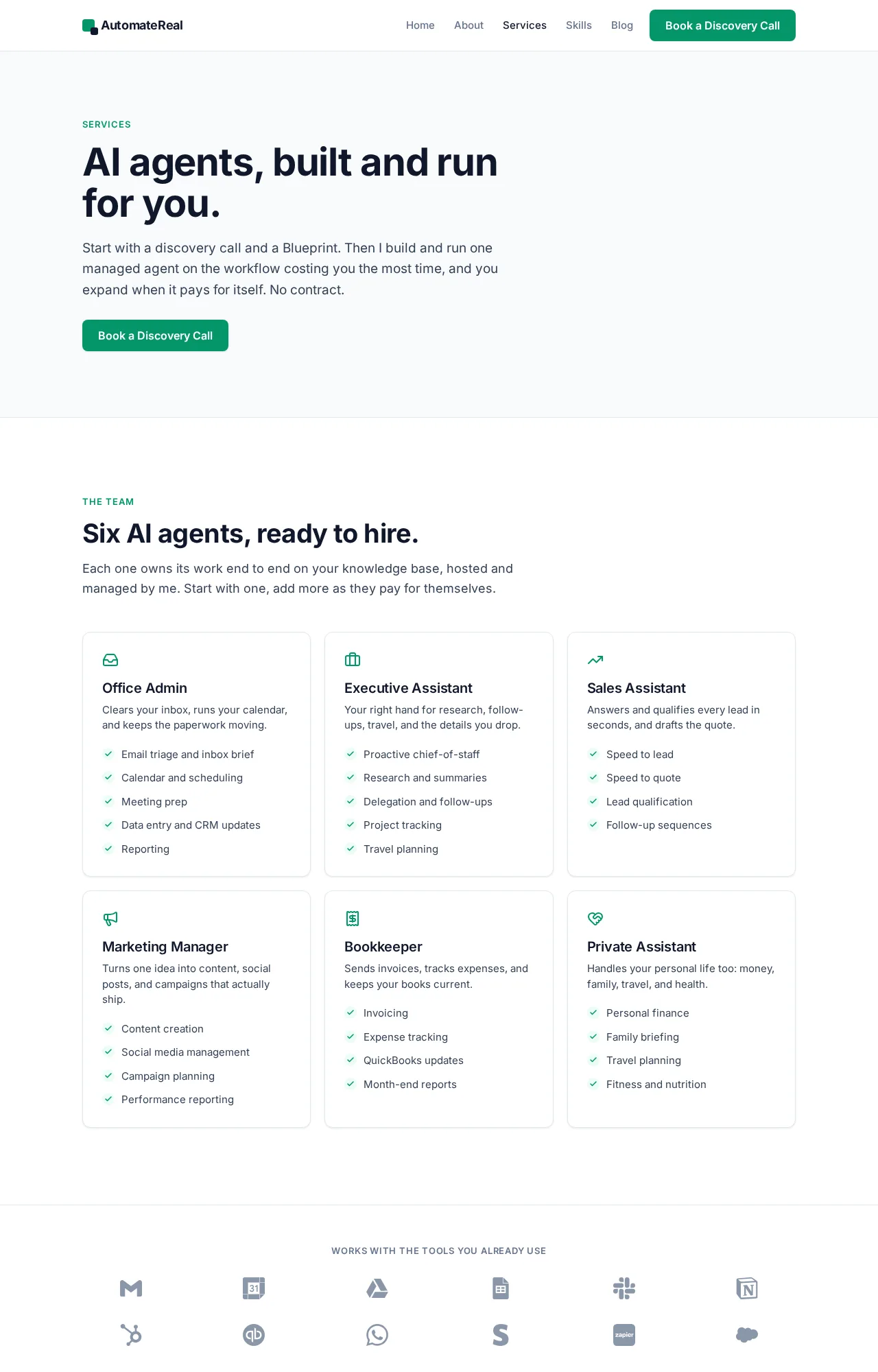 The AI services page: knowledge structure, build and handover.
Buy a tool for the job everyone has. Have one built for the job only your business has.
Related: How to Build an AI Agent
Related: AI Agents Examples: Real Use Cases for Small Business
Related: What Is AI Automation? A Small Business Guide
FAQ
Can I get generative AI for free?
Yes. Google AI Studio runs Gemini models on a free tier, and ChatGPT, Copilot, Claude and Perplexity each have a free plan. Limits are lower than paid, and the “free ai agents for small business” searches land in the same place.
Is generative AI safe to use in customer replies?
A drafted reply is safe once a person has read it and confirmed the facts. The risk is an unchecked price, date or address, not the model itself. Read it as the customer, then send it.
Who owns what generative AI writes?
Protection needs human authorship today, and the Copyright Office is still examining work made only by a machine. The edits you write are the part you can claim. Keep the drafts and the edits on file.
Do I have to tell customers that AI wrote something?
No US law requires a label on every AI-written message. The FTC treats a false claim as deceptive whatever wrote it, and EU law requires disclosure for certain synthetic media. Being straight with customers costs you nothing.
What is the difference between generative AI and AI agents?
Generative AI makes content, and an agent takes steps toward a goal. That one line is the whole split.
IBM draws the same line in generative AI versus agentic AI. This site covers how generative AI differs from agentic AI in its own post.
Will generative AI replace someone on my team?
It takes over tasks, not roles. First drafts, summaries and standard replies go to the model. The judgment, the relationship and the final call stay with a person.
Generative AI is cheap, fast and careless about being wrong. The first job worth handing over is the one you can check in a minute. If you want help finding it, a discovery call maps it out in about thirty minutes.
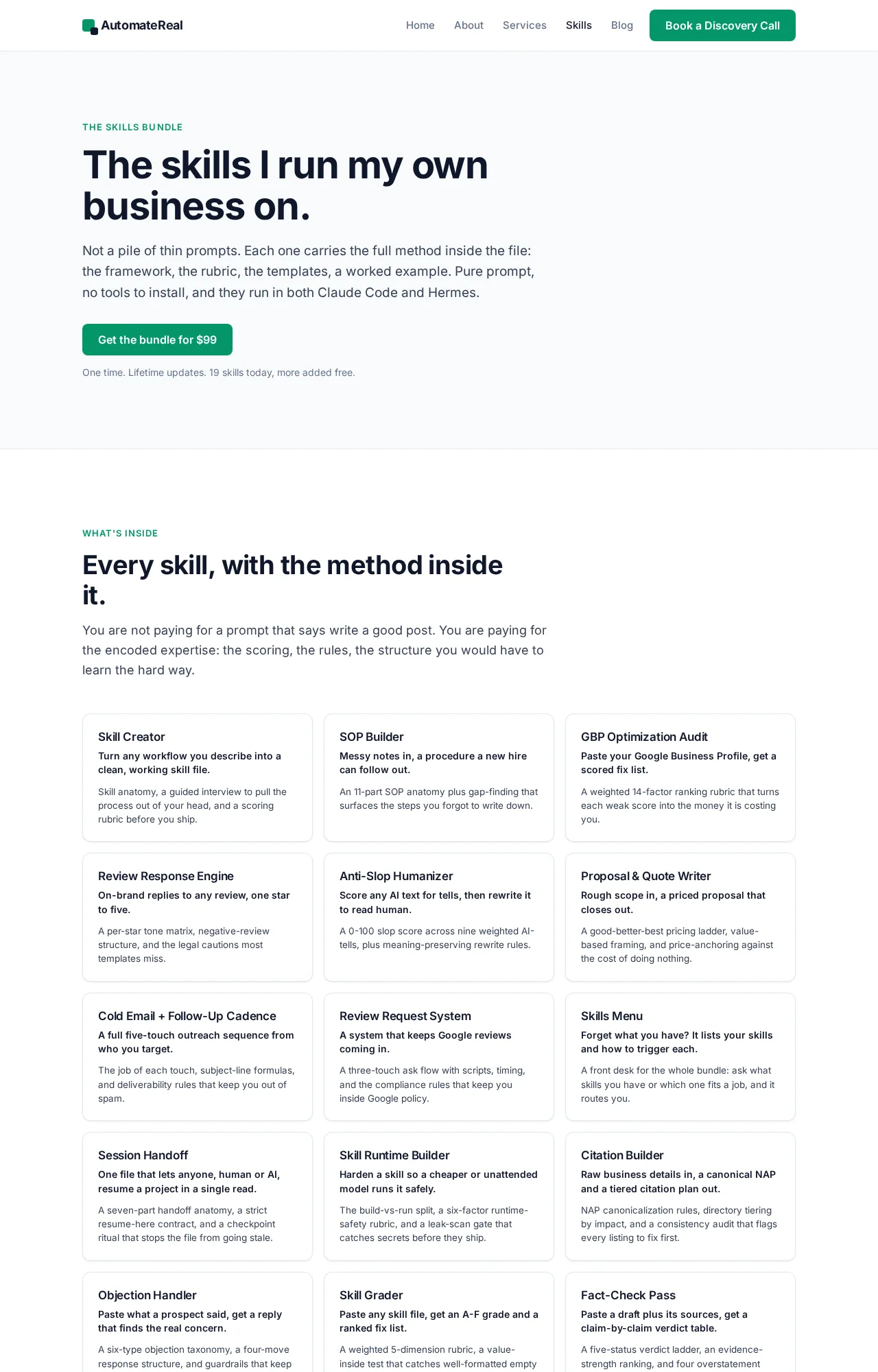 The prompt set I run my own marketing and SEO on.