LangChain Agent Builder: LangSmith Fleet, No Code, Cost
LangChain's agent builder is now LangSmith Fleet. What it builds without code, what it costs per seat, where it stops, and when to use LangGraph instead.
LangChain renamed its agent builder, and the search results did not follow. Every page ranking for the phrase still calls it Agent Builder.
That gap costs you time before you build anything, because the tutorial you pick may use a product name the docs have retired.
What is the LangChain agent builder, can you use it without writing code, and what does it cost?
LangChain’s agent builder is LangSmith Fleet, its no-code product. You describe the job in plain language and it writes the instructions and picks the tools. It adds memory and subagents, then runs the agent in Slack, Teams or Gmail on a schedule. The open source LangChain and LangGraph frameworks are still the code path underneath.
The pages ranking for this phrase are an IBM tutorial about a different LangChain tool. Another is a forum thread with one answer. A third is a wall of customer logos. None prints the price, and none says who fixes the agent in week two. This page does both.
TLDR
- The current name is LangSmith Fleet. Agent Builder is the old one, and the docs redirect the old name to the same page.
- No code is needed to build and run an agent. Code enters when the agent has to live inside your own product.
- Developer is $0 per seat with one seat. Plus is $39 per seat per month with unlimited seats.
- What breaks in month one is credentials and scope. The prompt is the easy half.
What is the LangChain agent builder, and why is it now called LangSmith Fleet?
It is the no-code agent builder inside LangSmith. LangChain renamed it LangSmith Fleet, and the old Agent Builder name still resolves to the same product and the same agents.
The Fleet docs settle it in one line: “Agent Builder is now LangSmith Fleet.” The sentence after it matters more if you already built something. Existing agents, configurations and integrations keep working, and no action is required.
The rename had a runway. LangChain shipped it as a private preview on October 29, 2025, billed as a no code agent-building experience. The public beta opened on December 2, 2025. General availability landed on January 13, 2026, when LangChain said the builder was available on all LangSmith plans.
Same docs, plainer words: it is “a no-code platform for creating and managing AI agents”. You start from a template or by describing the job, and approvals cover the actions that matter.
Five names sit around this product, and they are not interchangeable:
- LangChain is the open source framework, an MIT-licensed library that is free to use.
- LangGraph is the durable runtime those agents run on, with persistence and checkpointing.
- LangSmith is the platform around them, covering tracing, evaluation and deployment.
- LangSmith Fleet is the no-code builder on top, built on Deep Agents with a file-based memory system.
- LangSmith Tool Server is a separate MCP framework, and Fleet does not need it.
Fleet and Agent Builder are the same product, so a tutorial written under the old name still works.
How do you build your first agent, step by step, and how long does it take?
Sign up, describe the job, review the instructions it drafts, connect one app, then test it in the chat panel. Budget an afternoon for the first one that has to survive a real inbox.
Here is the order the Fleet quickstart walks a new account through:
- Sign up. A free account works, since Developer includes one seat.
- Describe the agent. Fleet writes the instructions and selects tools, pausing at key points for your input.
- Or start from a template. The agent templates arrive with instructions, tools and channels set, built with Tavily, PagerDuty, Exa, Box and Arcade.
- Connect your accounts. You authorise the services the agent touches, then run it and edit instructions in a few clicks.
- Set identity. Agent identity decides whose credentials the agent uses, either fixed credentials (“Claws”) or user credentials (“Assistants”). Channels and schedules require fixed credentials.
- Add a channel or a schedule. Slack and Teams start it on a message. Gmail starts it on an inbound email. Schedules start it on a clock.
LangChain’s public beta announcement says a new account can create agents “in a few minutes” without code. That time buys the draft. The rest of the afternoon goes on the wiring around it.
Step five is the one people skip. The docs state that once an agent identity is set, it cannot be changed, so that choice is permanent for that agent.
I run an automated outreach system, and the first thing I check in any new tool is who owns the credentials. A demo that works under your own login is a different system once a team touches it.
The generic version of these steps lives in how to build an AI agent, which covers the build steps for a small business. Read that one for the wider set of no-code builders. This page keeps only the LangChain-specific moves.
 AutomateReal skills
Templates get you to a draft in minutes. Credentials and channels are what make it a system.
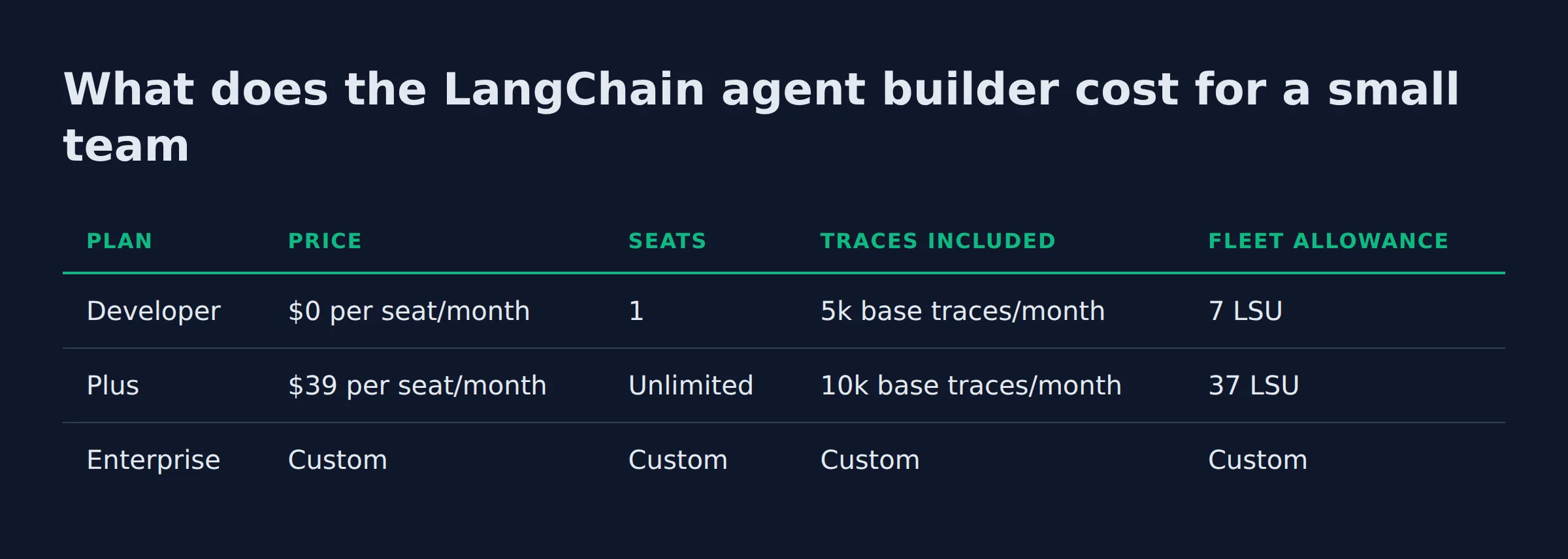
What does the LangChain agent builder cost for a small team?
Developer is $0 per seat with 1 seat and 5k traces a month. Plus is $39 per seat per month with 10k traces and unlimited seats. Model cost sits inside the LSU meter, and the Fast, Pro and Max tiers burn it at different rates.
The published pricing page lists three tiers, and the Fleet allowance on each is metered in LangSmith Standard Units (LSU) at $1.00 each:
| Plan | Price | Seats | Traces included | Fleet allowance |
|---|---|---|---|---|
| Developer | $0 per seat/month | 1 | 5k base traces/month | 7 LSU |
| Plus | $39 per seat/month | Unlimited | 10k base traces/month | 37 LSU |
| Enterprise | Custom | Custom | Custom | Custom |
Plus also carries one free Serverless (Small) deployment. Extra traces bill at 0.005 LSU each, which is $5 per 1,000 traces beyond the included volume.
The model cost sits inside that same meter. LangChain’s pricing FAQ says so in plain words: “Fleet pricing now includes underlying model costs”, and no provider API key of your own is needed.
On AI agent cost for small business, most pages quote a subscription and stop there. Four things move this bill:
- Seats. $39 each on Plus, multiplied by however many people need their own agent.
- Traces per run. Every workflow run leaves a trace, and a long agent leaves several.
- Model tier per run. Fast, Pro and Max consume different amounts of LSU for the same job, so a heavier tier burns the allowance faster.
- Deployment size. Serverless comes in Small, Medium and Large, and Dedicated is charged on resources consumed.
The calculator on the pricing page prints its own caveat under the estimate: “Estimate only. Actual LSU consumption varies with the work your agents perform.” The allowance has a harder edge. Developer includes 7 LSU per organization each month, and Fleet pauses new runs when the allowance runs out. Plus includes 37 LSU and bills usage past that.
$39 a month is about $9 a week. When I price a workflow, I compare that to the hours it hands back. My own lead system takes roughly 200 form submissions a day, and calls per record sets its running cost well ahead of the seat price.
Traces and the model tier set the bill on top of the seat price. Only your usage data can price them.
LangChain agent builder vs LangGraph vs the no-code tools: which one fits the job?
Fleet fits a workflow your team runs in chat and email. LangGraph fits a product you ship, where you control state and deployment. Most small teams start on Fleet, then move one workflow to code when it earns the move.
| Option | Fits when | Code needed | Where it runs |
|---|---|---|---|
| LangSmith Fleet | The job starts in Slack, email or on a clock | None to start | Slack, Teams, Gmail, schedules, API |
| LangGraph | The agent is part of your product | Python | Your own infrastructure |
| n8n AI agent builder | You want a workflow you can inspect step by step | Workflow design | Self-hosted or cloud |
| Microsoft Copilot Studio | Your stack is Microsoft 365 | Low code | Teams and Microsoft 365 |
LangChain publishes its own how Fleet compares page against Claude Cowork, Amazon Quick, Google Workspace Studio and Microsoft Copilot Studio. Read it as a vendor page. It claims Fleet is the only option in that set with a self-hosted path and code export. The Fleet docs note that self-hosting is in beta.
You can also take a Fleet agent into code. Call it through the LangGraph SDK or a REST request. Or export your agent as a self-contained Python project with the fleet-deepagents-export package. Exported agents run on Agent Server, the same runtime behind every LangSmith deployment.
That export path is the honest difference from a closed no-code tool. You are not stuck in the console for the life of the agent.
If you want the no-code option priced per workflow instead of per seat, the n8n AI agent builder page covers that trade. If your company already runs Microsoft 365, the Copilot agent builder is the enterprise-stack route.
Every agentic AI for business decision comes back to ownership. Someone has to hold the credentials, watch the runs and fix the gate. Our AI services page exists for the teams that want that built and handed over.
 AutomateReal services
Pick by where the agent has to live. Chat and email point to Fleet. Your own product points to LangGraph.
What can you actually automate with it in a service business?
Work that starts as an email, a chat message or a clock tick, and ends as a reply or a record. Meeting briefs, inbox triage, quote follow-up and weekly digests all fit that shape.
LangChain’s own launch list is short: daily meeting briefs, competitor digests into Slack, and PRDs turned into Linear issues. The service business version of those:
- Inbound request triage. A Gmail channel starts the agent when mail arrives, and the docs list read, reply, draft and label tools for it.
- Quote follow-up. A schedule runs the chase on a fixed cadence, so nobody has to remember.
- Daily brief. Pull the day’s mail and calendar into one message before the first call.
- Market or competitor digest. A scheduled run posts a summary into a Slack channel.
- Document to record. The PRD-into-Linear pattern applied to bids, invoices or intake forms.
The AI agent examples for small business that hold up are the boring ones. They start with an event, end with a record, and need no judgement.
Two limits shape what you pick. The Gmail channel watches the primary inbox only, so alias mail and filtered mail never start it. And schedules are in UTC, which means a 7am brief needs converting by hand.
Most of what I automate is lead intake and follow-up, and both fit this shape exactly.
The channel sets the boundary. If your forms land in an alias inbox, a Gmail channel will never see them.
What breaks in month one, and who fixes it?
Credentials pinned to the wrong identity, and instructions broad enough to hide a bad result. Both show up in week one, and both need a person with admin access to fix.
I built a pipeline that reads long bid documents and pulls out the fields. It drops duplicates, then routes one record per job into a team chat and a sheet.
Week one produced two defects worth naming. It routed a duplicate row, and it sent a link that opened a directory page instead of the listing someone could apply to.
The rules around the model were thin. That is the week-one pattern for any agent doing real work.
The gate I added runs three checks before anything leaves the box:
- One record per job. Dedupe on the job id, not on the title.
- Every link resolves to the live page. A link to a search page counts as a failure.
- One human click before send. Approvals are the point of the gate.
Fleet covers the third check at the tool level, since it supports approvals for important actions. The first two are yours to write, in the instructions or in code.
Where the no-code path ran out for me was the rules layer. Dedupe keys, retries and writes into a database I own all wanted code around the agent.
Fleet answers that with export to code, where the agent becomes a Python project you can wrap. Budget that step instead of assuming the console covers it.
Ownership is the answer to who fixes it. The person holding the LangSmith workspace and the connected accounts fixes it, and that is rarely the person who wrote the prompt.
If nobody on your team wants that job, our AI services page covers the build and the gate. The handover leaves you holding the keys.
An agent fails quietly. A gate that checks the record and the link catches it before a customer does.
For a managed version, see the AI services page.
FAQ
Is the LangChain agent builder free?
The Developer plan is $0 per seat per month, includes one seat, and carries 5k base traces a month plus 7 LSU of Fleet usage. That covers a real pilot for one person. A team needs Plus at $39 per seat.
Do you need to know Python to use LangSmith Fleet?
No for building and running an agent. You describe the job, review the instructions and connect apps in the browser. Python enters when you export the agent or call it from your own code.
What happened to LangSmith Agent Builder, and do old agents still work?
It was renamed LangSmith Fleet. The docs say all existing agents, configurations and integrations continue to work, and no action is required. Tutorials using the old name still describe the same product.
Can you export a Fleet agent to code and run it yourself?
Yes. The fleet-deepagents-export package turns the agent into a self-contained Python project, and the result runs on Agent Server. You can also call the agent remotely with the LangGraph SDK or a REST request.
LangChain agent builder versus LangGraph: which one do I need?
Fleet if the agent serves your team inside Slack, email or a schedule. LangGraph if the agent is a feature of a product you sell. They stack, because a Fleet agent can be exported onto the same runtime.
Does it connect to the tools I already use, and where does it run?
Slack, Microsoft Teams and Gmail are built-in channels, and remote MCP servers cover the rest of your stack. The model layer is neutral across OpenAI, Anthropic and Gemini. Agents run in LangSmith on Agent Server, or self-hosted while that option stays in beta.
Where to go from here
Fleet is cheap to test and awkward to redo once identity and channels are set, so test it on one workflow first. If the workflow fits the shape above, the free tier proves it this week.
If you would rather have the first agent built and the gate written for you, a discovery call maps the workflow in about thirty minutes.