n8n AI Agent Tool: How Agent-as-Tool Works
The n8n AI Agent Tool lets one agent call another agent as a tool. How the sub-node works, how it differs from the AI Agent node, and what breaks.
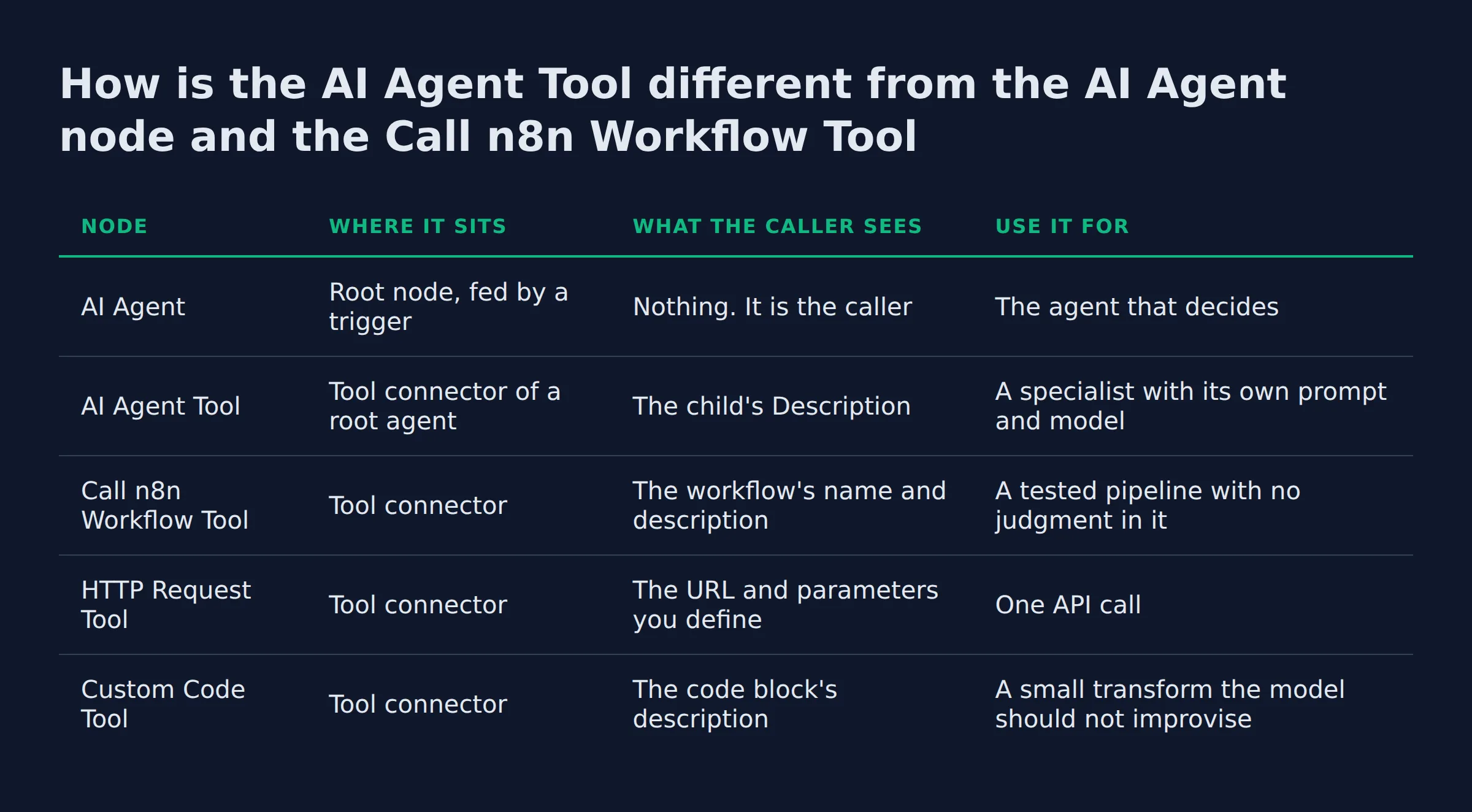
Give a parent agent three children and watch which one it picks. The choice happens before any child reads a word of the task, because the parent only ever sees a name and a description.
The n8n AI Agent Tool is a sub-node that lets one AI Agent call another agent as a tool. The parent reads each child’s description and delegates work to it, so you get multi-agent orchestration on one canvas without sub-workflows. Children nest in layers, and each one carries its own description and prompt.
TL;DR
- The
AI Agent Toolturns one agent into a tool that another agent can call. - The parent chooses by description, so a vague description causes a silent misroute.
- A parent with three children is one workflow execution and five model calls.
- A three-child run costs about 5 cents on a Sonnet-class model at current list prices.
What is the n8n AI Agent Tool, and what does it add to a workflow?
It is a sub-node that hangs off a root agent’s tool connector. The root agent decides whether the child runs at all, and it can call two children in a row or skip them both.
n8n frames the node as a way for a root-level agent to call other agents as tools. The point is multi-agent work on one canvas, with no sub-workflow and no hand-managed context or variables between the two agents according to the node docs.
What you gain is a short prompt per specialist. A refund child reads refund rules. A pricing child reads the rate card. Neither one carries the other’s instructions, and the parent’s context stays small because it only reads their answers.
My own content production runs as a chain of separate agents: researcher, planner, writer, reviewer, publisher. Each stage takes a brief and returns one artifact. That is the same shape as a parent delegating to children, built with files and a scheduler instead of a canvas.
How is the AI Agent Tool different from the AI Agent node and the Call n8n Workflow Tool?
The AI Agent node is the root that takes the task and picks tools. The AI Agent Tool is a child, reachable only through another agent’s tool connector. The Call n8n Workflow Tool runs fixed steps with no model choosing anything, which suits a pipeline you have already tested.
The names blur until you look at what sits on the canvas.
| Node | Where it sits | What the caller sees | Use it for |
|---|---|---|---|
AI Agent |
Root node, fed by a trigger | Nothing. It is the caller | The agent that decides |
AI Agent Tool |
Tool connector of a root agent | The child’s Description |
A specialist with its own prompt and model |
Call n8n Workflow Tool |
Tool connector | The workflow’s name and description | A tested pipeline with no judgment in it |
HTTP Request Tool |
Tool connector | The URL and parameters you define | One API call |
Custom Code Tool |
Tool connector | The code block’s description | A small transform the model should not improvise |
n8n calls the workflow tool, the custom code tool and the HTTP request tool its three especially powerful tools as described in the tools guide. It also ships a registry of MCP servers, reached through the MCP Client Tool.
In the other direction, an MCP Server Trigger makes n8n itself an MCP server that outside clients can call per the trigger docs.
The AI Agent Tool sits in the same slot as those. That is what agent-as-tool means in practice: the parent calls a tool, and the tool happens to be another agent.
Under the hood the Tools Agent runs LangChain’s tool calling interface, which describes each tool and its schema to the model per the Tools Agent page. An agent exposed as a tool is described the same way, which is why the wording of Description matters so much.
One rule holds either way. An AI Agent node needs at least one tool sub-node before it acts as an agent at all per the AI Agent node reference. A child agent counts as that tool.
If you are still weighing a prebuilt builder against a canvas you own, the n8n AI agent builder explained post covers that split. This page assumes the canvas and the second agent.
The three-question test before you add a second agent
Add a child only when the job needs instructions the parent should not carry.
- Does this work need its own prompt? A different set of rules, examples or an output format.
- Does it need a different model? Cheap for routing, strong for drafting.
- Would plain workflow steps do it? A fixed path with no judgment belongs in nodes.
Two noes and the child is overhead. You pay for a model hop that a Set node would have handled, and you add a place for the run to go wrong.
My lead-gen system takes about 200 form submissions a day through plain workflow steps. Nothing on that path needs a model to choose a tool, so no agent sits in it. The same fields arrive in the same shape every time, and a fixed path already covers that.
How do you wire an AI Agent Tool so the parent agent delegates correctly?
Connect the child to the parent’s tool connector. Write Description as a routing rule and Prompt (User Message) as a self-contained instruction. Turn on Require Specific Output Format when the parent needs fields back, and test with Return Intermediate Steps on.
The node-by-node build for a single agent lives in how to build an AI agent step by step. Start from a parent that already works alone.
- Prove the parent by itself. One
AI Agentnode, one or two plain tools, a task it finishes. A child cannot rescue a parent that cannot decide. - Name the child for its job.
Refund eligibilityroutes better thanSupport agent 2. - Fill
Descriptionwith the routing rule. State when to call it and when to leave it alone. - Write
Prompt (User Message)for a stranger. The child does not inherit the parent’s chat, so restate the fields, the job and the format. - Attach a
Structured Output ParserunderRequire Specific Output Formatwhen the parent has to parse the answer. TheAuto-fixing Output ParserandItem List Output Parserare the other two options on that setting listed on the Tools Agent page. - Set
Enable Fallback Modelon anything customer-facing. n8n describes it as a backup chat model for when the primary model fails or is unavailable per the node reference. - Turn on
Return Intermediate Stepswhile you test, then turn it off so the parent’s context stays small. - Gate the tools that send, delete or charge behind human review. The run pauses and asks for approval in Chat, Slack or Telegram, and the person can approve or deny it per the Tools Agent page.
One trap sits under all eight steps. In a sub-node, an expression always resolves to the first item rather than to each item in turn under parameter resolution. A child reading {{ $json.order_id }} from five items only ever sees the first order.
Two more options carry weight. System Message sets the rules a child reads before its prompt, and the tool node documents no memory option, so each child call starts fresh. On the parent, a Chat Trigger plus a memory sub-node carries the conversation across turns per the Tools Agent page.
For app-node tools inside a child, $fromAI() lets the model fill parameters from the conversation documented with the tool nodes.
Why does the tool description decide whether delegation works?
The parent picks by description alone. It never reads the child’s prompt, tools or model. A description that overlaps another child’s leaves the parent with no reason to prefer one, and the run reports nothing wrong.
n8n’s guidance is blunt on this point. The Description tells the parent when to delegate to that agent, and a specific one is what makes the choice work in the node parameters. That field is a routing table written in English, with no schema to check it.
Nothing errors when the wrong child answers. The reply arrives in the right format, the parent passes it on, and the mistake shows up in a customer email a day later.
Two descriptions, one winner
A description does three jobs: name the task, name the trigger, name the boundary.
- Weak: “Handles customer questions.” Every child can claim that, so the parent has no tiebreaker.
- Workable: “Use for refund eligibility on orders placed in the last 30 days. Do not use for shipping status or address changes.”
The exclusion line is the half that stops misroutes, and it is the half most descriptions leave out.
My own pipeline hands work between agents the same way. The brief carries a title, a description and a fixed question list, and the next agent reads only those. When the title drifts from the body, the draft drifts with it, so I repair the brief instead of re-prompting the writer.
AutomateReal skills
Keep each child to one job and one exclusion. Two sentences of qualification means the child is doing two jobs.
What breaks first in a multi-agent n8n workflow?
Misroutes come first, then empty child output. A green run proves only that the workflow finished, so the first thing to check is whether the child you expected actually answered.
| Failure | What you see | First fix |
|---|---|---|
| Overlapping descriptions | The generalist child answers a specialist question | Add an exclusion line to each description |
| No usable input | A short, generic reply with no error | Pass the fields inside Prompt (User Message) |
| Child loops | It stops at Max Iterations, 10 by default, with a partial answer |
Narrow the job or hand it a deterministic tool |
| Sub-node expression | The child answers about the first item every time | Map the fields into the prompt explicitly |
| Rate limit | HTTP 429 from the model or an API | Use Batch Size and Delay Between Batches, or the fallback model |
| Plausible wrong answer | Correct format, wrong content | Turn on Return Intermediate Steps and read the path |
The bottom two cost the most. A 429 is loud and shows up in a log. A confident wrong answer ships.
What does a multi-agent setup cost to run?
Two bills arrive. n8n bills a workflow run rather than a node or a step, so a parent calling three children is still one execution. The model vendor bills tokens for every agent turn, and the fan-out multiplies that bill.
Here is one worked run at published list rates. It is arithmetic, not a bill I received. The token budget is a fan-out to three children on a mid-size task.
| Step | Input tokens | Output tokens | Cost at $2 and $10 per million |
|---|---|---|---|
| Parent reads the task and picks a child | 2,000 | 250 | $0.0065 |
| Three children, 3,000 in and 400 out each | 9,000 | 1,200 | $0.0300 |
| Parent writes the final answer | 4,500 | 500 | $0.0140 |
| One run | 15,500 | 1,950 | $0.0505 |
Those rates are Claude Sonnet 5.5 at $2 per million input tokens and $10 per million output tokens from Anthropic’s model pricing. The same token budget on other models swings the per-run cost by a wide margin.
| Model | Input per million | Output per million | One run | 100 runs a day for 30 days |
|---|---|---|---|---|
| Claude Haiku 5.5 | $0.10 | $0.50 | $0.0025 | $7.58 |
| Claude Sonnet 5.5 | $2.00 | $10.00 | $0.0505 | $151.50 |
| Claude Opus 5.5 | $4.00 | $20.00 | $0.1010 | $303.00 |
The cheap model runs the same tokens for about 20 times less. Routing belongs on the cheap one, drafting on the strong one.
At 100 runs a day you use 3,000 executions a month. That sits inside the 10,000 that n8n’s Pro plan covers at 50 euros a month billed annually n8n pricing. The grid counts executions, not steps, so a wider fan-out costs the same plan money and more model money.
What does an agent calling agent tools look like in a small business?
A parent agent reads an inbound quote request and routes it. One child pulls the job details, one drafts the estimate, one writes the follow-up. The parent writes the reply the customer actually reads.
- Intake child: reads the form submission and returns job type, size and timing.
- Estimate child: takes those fields plus the rate card and returns line items.
- Follow-up child: writes the next 3 touches after the quote goes out.
The parent’s job stays small. Pick a child, pass the right fields, write one clear sentence.
Where I would put money first is the routing test. Run 50 real requests through the parent with Return Intermediate Steps on, then count the misroutes. That count answers whether the second agent earns its place.
For a small shop the honest answer is often one agent with 3 good tools. The second agent earns its keep once the instructions start fighting each other.
If you would rather have it built, the AI services page shows how that runs.
AutomateReal services
FAQ
Does the AI Agent Tool work on the Community Edition?
Yes. The node ships in the base install, so a self-hosted Community Edition has it from the first run. Agent-as-tool work needs no paid tier.
The AI Agent Tool is a built-in sub-node, so it is on the canvas as soon as the instance is up. The Community Edition ships on GitHub for self-hosting n8n pricing.
The repo’s LICENSE.md puts everything outside its enterprise files under the Sustainable Use License n8n repo. Queue mode is the piece that needs a paid tier, listed from the Business plan upward the plan grid.
Can a child agent call the parent back, or call itself?
Not through anything the docs describe. A child receives its input, runs its own tools and returns a final answer, so the traffic only runs downward.
The node page documents nesting children inside children, and it names no way back up AI Agent Tool reference.
What happens when a child agent hits Max Iterations?
It stops and returns what it has. The parent treats that partial answer as the tool result, so a thin child answer travels up the chain.
Max Iterations caps how many times the model runs before it answers, and n8n sets the default at 10 Tools Agent options.
Can the parent agent see the child’s intermediate steps?
Only if the child puts them in its output. Leave the option off and the parent gets the answer with no view of how the child reached it.
Return Intermediate Steps adds those steps to the child’s final output AI Agent Tool options.
How many layers of nesting are practical?
Two. Each extra layer is a router you cannot see in the final answer, so past two you are debugging routing instead of shipping the job.
n8n allows more than two, and its docs describe nesting agents into multiple layers AI Agent Tool reference.
If you are mapping a first delegation, a discovery call walks the parent and its children in about thirty minutes. You leave with the descriptions written, or with a clear answer that one agent is enough.